Your Shopify store is live. The theme looks clean, products are uploaded, and the checkout works. But within the first week of real orders, things start falling apart.
Payment confirmations go missing. Shipping updates don’t reach customers. Your accountant is manually entering every order into Tally. And the WhatsApp messages you promised buyers? You’re copy-pasting tracking numbers one by one.
This is where most Shopify stores in India get stuck. Not because the platform is limited, but because the integrations that connect your store to everything else were either missing, misconfigured, or never set up in the first place.
Shopify integration is the process of connecting your store with external tools and systems so that data flows automatically between them. Payment gateways, shipping providers, accounting software, CRM tools, marketplaces, WhatsApp automation platforms. Each one serves a function that Shopify doesn’t handle natively, especially for the Indian market.
And that last part matters more than most store owners realize. Shopify was built for global commerce. But Indian ecommerce runs on UPI, cash on delivery, Shiprocket, Tally, WhatsApp, and GST invoicing. None of these come pre-configured. Every single one needs to be integrated separately.
This guide breaks down the types of Shopify integrations that actually matter, the tools Indian stores rely on, the setup process, what it costs, and the mistakes that quietly drain revenue when integrations are done wrong.
What Is Shopify Integration?
At its simplest, Shopify integration means connecting your Shopify store with an external tool so they can share data automatically.
When a customer places an order, that order data needs to go somewhere. To your payment gateway for processing. To your shipping partner for dispatch. To your accounting software for invoicing. To your WhatsApp tool for sending order confirmation. Without integrations, someone on your team is doing all of this manually.
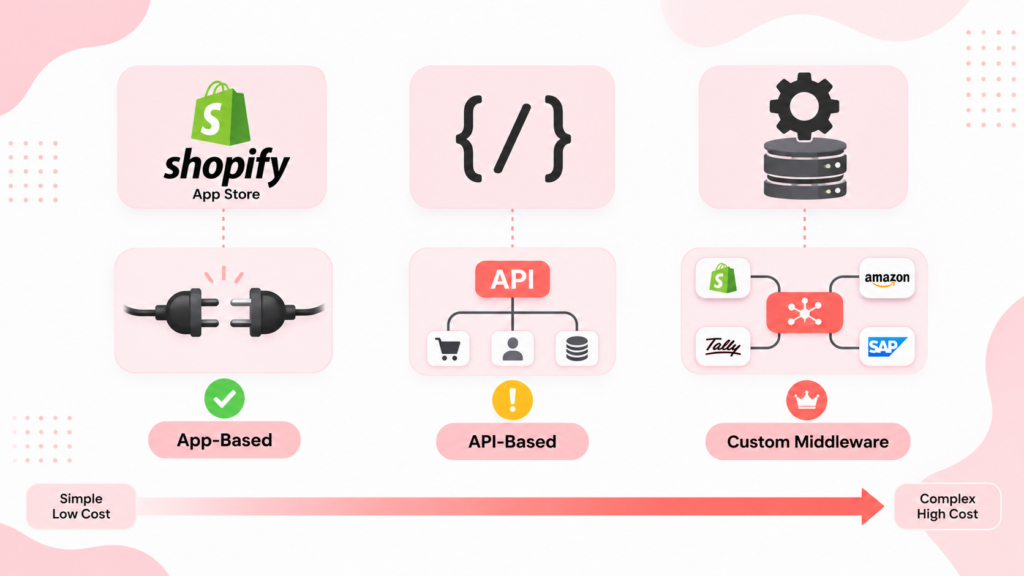
There are three ways integrations work on Shopify:
App Store Integrations are the most common. You install an app from the Shopify App Store, connect your accounts, and the app handles the data sync. Shiprocket, Razorpay, WATI, Klaviyo all work this way. Installation takes minutes, configuration takes longer.
API-Based Custom Integrations are built by developers when no ready-made app exists or when the app doesn’t do exactly what your business needs. For example, connecting Shopify with a custom-built warehouse management system or syncing orders with Tally ERP through a middleware layer. These require development work and ongoing maintenance.
Webhooks and Automation Tools sit in between. Shopify sends real-time notifications (webhooks) whenever something happens in your store, like a new order, a cancelled order, or an inventory update. Tools like Zapier or custom webhook handlers can catch these notifications and trigger actions in other systems.
The key thing to understand: Shopify is not an all-in-one platform. It handles your storefront and checkout brilliantly. Everything else, from payments to post-purchase communication, runs through integrations. And the quality of those integrations directly determines how smoothly your store operates day to day.
Why Shopify Integration Matters for Your Store
A Shopify store without proper integrations is like a car with no engine connected to the wheels. The parts exist, but nothing moves the way it should.
Here’s what goes wrong when stores skip or misconfigure integrations:
Manual data entry eats your team’s time.
Without an accounting integration, every order gets entered into Tally or Zoho manually. At 50 orders per day, that’s 2–3 hours of someone’s workday gone. At 200 orders per day, it’s a full-time job that shouldn’t exist.
Customer experience breaks down.
Buyers expect instant order confirmation on WhatsApp, real-time tracking updates, and accurate delivery estimates. If your shipping integration isn’t syncing properly, customers are pinging your support team asking “where is my order” instead of getting automated updates.
Inventory goes out of sync.
If you sell on your Shopify store, Amazon India, and Flipkart but your inventory isn’t synced across channels, you’re one busy sale day away from overselling. Overselling means cancelled orders, refund processing, and angry reviews.
You lose money on every COD order.
Without a COD management integration, you can’t restrict cash on delivery by pin code, cart value, or customer history. The result? High RTO (return to origin) rates, wasted shipping costs, and products stuck in reverse logistics for weeks.
GST compliance becomes a nightmare.
Indian stores need GST-compliant invoices, HSN codes on every product, and state-wise tax breakdowns. Without an accounting or GST integration, your CA is manually reconciling hundreds of invoices every month.
Proper integrations don’t just save time. They reduce errors, improve customer satisfaction, keep your finances clean, and let you scale without hiring more people to do work that software should handle.
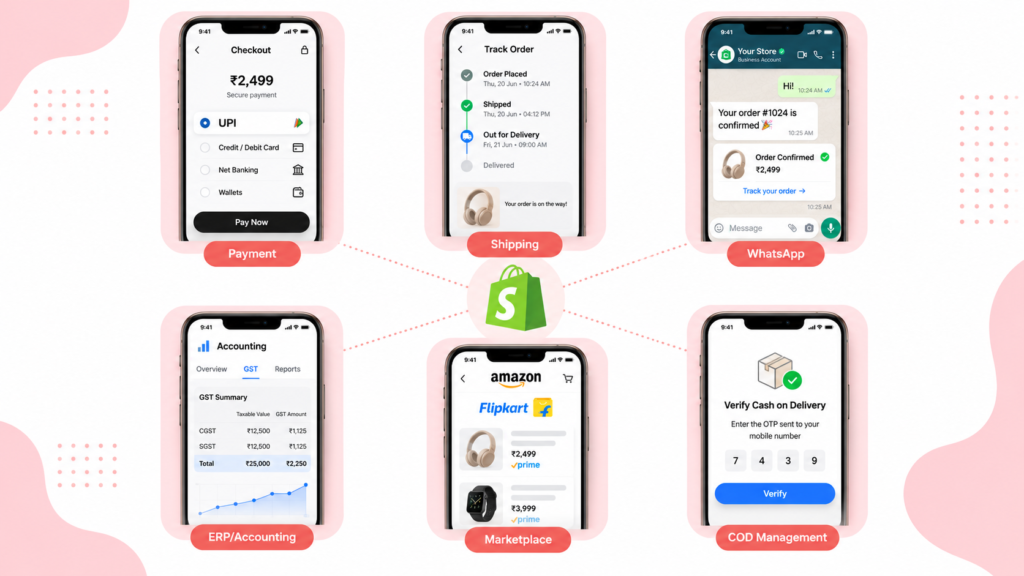
Types of Shopify Integrations (With Tools Used in India)
Every Shopify store needs integrations across a few core areas. Here’s what each category covers, which tools Indian D2C brands actually use, and what to expect.
1. Payment Gateway Integrations
Shopify Payments isn’t available in India. That’s the first thing most new store owners discover, and it changes how the entire checkout works.
Instead of the native Shopify checkout processing payments directly, Indian stores rely on third-party payment gateways. These gateways handle UPI, credit/debit cards, net banking, wallets, and EMI options that Indian buyers expect.
Commonly used gateways:
- Razorpay – The most popular choice for Indian Shopify stores. Supports UPI, cards, wallets, and offers a decent dashboard. Standard pricing is 2% per transaction. Most agencies default to Razorpay for new store setups because documentation is solid and the Shopify app works without custom code.
- Cashfree – Lowest transaction fees at 1.90%. Good option for stores doing high volume where even a 0.10% difference adds up over thousands of orders per month.
- PayU – Established player with EMI options and multi-currency support. Works well for stores that also sell internationally.
- Paytm Payment Gateway – Useful if your audience already uses Paytm wallets. Less common for pure D2C stores but still a viable option.
What integration involves: Installing the gateway’s Shopify app, configuring API keys, testing sandbox transactions, setting up webhook callbacks for payment confirmation, and mapping order statuses. For most gateways, this is a 1–2 day setup if you’ve done it before.
2. Shipping and Logistics Integrations
Shipping is where Indian Shopify stores live or die. With COD (cash on delivery) still making up 50–65% of orders for most D2C brands, the logistics integration needs to handle more than just generating labels.
Commonly used platforms:
- Shiprocket – The default choice for Indian D2C. Aggregates 25+ courier partners (Delhivery, BlueDart, Ecom Express, etc.), auto-assigns the cheapest or fastest courier per pin code, and handles NDR (non-delivery report) management. Most stores start here.
- Delhivery – Direct integration for stores doing enough volume to negotiate rates. Better tracking accuracy than aggregators for their own network.
- iThink Logistics – Growing alternative to Shiprocket with competitive pricing.
- NimbusPost – Another aggregator option with a clean dashboard.
What integration covers: Auto-syncing orders from Shopify, generating AWB (airway bill) numbers, printing shipping labels, pushing tracking updates back to Shopify, triggering WhatsApp/SMS notifications on status changes, managing returns and exchanges, and COD remittance reconciliation.
COD-specific features that matter: Pin code serviceability checks (restricting COD for certain areas with high RTO rates), minimum cart value for COD eligibility, COD verification via OTP or IVR, and automated COD-to-prepaid conversion nudges.
3. WhatsApp Commerce Integrations
In India, WhatsApp isn’t just a messaging app for stores. It’s the primary customer communication channel. Order confirmations, shipping updates, abandoned cart recovery, COD verification, review collection, and even catalogue browsing all happen on WhatsApp.
Email open rates for Indian D2C hover around 15–20%. WhatsApp message open rates? 85–95%. That’s why every serious Indian Shopify store runs WhatsApp commerce.
Commonly used platforms:
- Interakt (by Jio Haptik) – The most widely used WhatsApp BSP for Indian D2C Shopify stores. Affordable pricing, decent automation builder, and native Shopify integration for order triggers. This is what most stores start with.
- WATI – Clean UI, good for teams that want quick setup without much technical configuration. Slightly more expensive than Interakt.
- AiSensy – Budget-friendly option with basic automation. Good for stores just getting started with WhatsApp marketing.
- Gupshup – More of an enterprise-grade conversational platform. Used by larger brands with complex chatbot requirements.
What integration covers: Automated order confirmation messages, shipping and delivery updates, abandoned cart recovery sequences (typically 3-message sequences sent at 1hr, 24hr, 48hr intervals), COD order confirmation via WhatsApp, review and feedback collection post-delivery, broadcast campaigns for sales and launches, and two-way customer support.
4. ERP and Accounting Integrations
This is where Indian Shopify stores face a unique challenge. The accounting software ecosystem in India is completely different from the West. While international stores use QuickBooks or Xero, Indian businesses run on Tally and Zoho, and their CAs (chartered accountants) expect data in those formats.
Commonly used platforms:
- Tally Prime – Still the backbone of Indian business accounting. Most CAs work exclusively in Tally. The challenge? Tally doesn’t have a native Shopify app. Integration typically requires middleware or custom-built connectors that push Shopify order data into Tally-compatible formats.
- Zoho Books – The closest thing to a native Shopify accounting integration for Indian businesses. Starts at ₹899/month, handles GST compliance well, and has a proper Shopify connector. Best option for stores that want automated accounting without middleware.
- Busy Accounting – Popular in certain regions, similar challenges to Tally regarding Shopify integration.
- ERPNext – Open-source ERP that some larger D2C brands adopt. Requires technical setup but offers deep customization.
What integration handles: Syncing order data for invoicing, generating GST-compliant invoices with correct HSN codes, managing state-wise GST breakdowns (CGST/SGST for intra-state, IGST for inter-state), handling credit notes for returns, reconciling payment gateway settlements with actual orders, and generating reports that your CA can directly use for ITR filing.
5. Marketplace Integrations
Most Indian D2C brands don’t sell exclusively on their Shopify store. They’re also on Amazon India, Flipkart, and sometimes Myntra or Ajio. The goal of marketplace integration is keeping inventory, orders, and pricing in sync across all channels from one place.
Commonly used platforms:
- Amazon India – Has a decent Shopify integration through apps like CedCommerce. Product listing sync, order management, and inventory updates work fairly well.
- Flipkart – This is the tricky one. Flipkart doesn’t offer a native Shopify connector. Most brands use middleware like Unicommerce or Browntape to bridge the gap.
- Myntra/Ajio – Fashion and lifestyle brands often need these channels. Integration is typically handled through Unicommerce, which acts as a central order and inventory management hub.
What integration involves: Centralized inventory management (so a sale on Amazon reduces stock on Shopify automatically), unified order processing, consistent pricing across channels, and consolidated reporting. Without this, you’re managing each channel separately, which breaks down quickly past 100 orders per day.
6. COD Management and Verification
This deserves its own category because COD is a uniquely Indian challenge at scale. High RTO rates on COD orders can eat 10–15% of revenue if not managed properly.
Commonly used approaches:
- COD verification via IVR/WhatsApp – Tools like KnowBand and GoKwik send automated calls or WhatsApp messages to confirm COD orders before shipping. Reduces fake orders by 20–30%.
- GoKwik – Specifically built for Indian COD challenges. Offers COD-to-prepaid conversion, address intelligence, and RTO prediction.
- Pin code-based restrictions – Blocking COD for areas with historically high RTO rates. This can be configured through shipping apps or custom code.
- Minimum order value for COD – Setting a floor (say ₹500) below which COD isn’t available. Discourages low-intent orders.
What integration involves: Setting up automated verification flows, configuring COD availability rules per pin code, tracking RTO patterns and adjusting restrictions, and running COD-to-prepaid incentive campaigns (small discount for prepaid orders).
How Shopify Integration Works: The Setup Process
The actual process of integrating tools with Shopify falls into three categories, each with different complexity levels and costs.
App Store Integrations (Plug and Play)
This is the simplest path. Shopify’s App Store has thousands of apps that connect to your store with a few clicks. You install the app, authorize access, configure settings, and it starts working.
Examples: Razorpay payment gateway, Shiprocket shipping, Interakt WhatsApp, most review collection tools, basic SEO apps.
Who can do it: Store owners can handle most app installations themselves. Where it gets tricky is configuration. Installing Shiprocket takes 5 minutes. Configuring courier allocation rules, pin code restrictions, COD logic, and NDR workflows takes a full day of someone who knows what they’re doing.
Limitations: You’re limited to what the app offers. If the app doesn’t support a specific workflow you need, you can’t modify it. App subscriptions also add up. A store running Shiprocket, Interakt, a reviews app, an SEO app, and an analytics tool could easily spend ₹15,000–25,000/month on app subscriptions alone.
API-Based Custom Integrations
When an app doesn’t exist for what you need, or the available apps don’t work the way your business requires, you build a custom integration using Shopify’s APIs.
Shopify offers REST and GraphQL APIs that let developers read and write almost anything in your store: products, orders, customers, inventory, fulfillment, discounts, and more.
Examples: Custom Tally integration (pulling order data into Tally-compatible XML), custom ERP connectors, bespoke inventory sync between Shopify and a warehouse management system, connecting Shopify to a proprietary CRM.
Who can do it: You need to hire a shopify developer or an agency for this. Tally integration is one of the more common custom builds agencies handle for Indian D2C stores because there’s no reliable off-the-shelf solution. It typically involves building middleware that listens for Shopify order webhooks, transforms the data into Tally’s import format, and handles edge cases like partial refunds, exchange orders, and multi-location inventory..
Webhooks and Automation Tools
Webhooks are Shopify’s way of saying “when this happens, tell that system.” They send real-time notifications to external services whenever something changes in your store.
How it works: You register a webhook URL in Shopify. When an event fires (new order, payment captured, fulfillment created, product updated), Shopify sends a POST request with the event data to your URL. The receiving system processes it and takes action.
Low-code option: Tools like Zapier, Make (formerly Integromat), and Pabbly Connect let you set up webhook-based automations without writing code. For example: “When a new order is placed on Shopify, create a row in Google Sheets, send an SMS via MSG91, and add the customer to a Mailchimp list.”
Pabbly Connect is worth calling out specifically for Indian stores. It’s an Indian-made alternative to Zapier with one-time lifetime pricing (instead of monthly subscriptions), which makes it significantly cheaper for long-term use. Indian D2C brands use it heavily for stitching together tools that don’t have native integrations.
When to use automation tools vs. custom development: If the workflow is straightforward (trigger → action → done), automation tools work fine. If the workflow involves conditional logic, error handling, data transformation, or needs to scale to thousands of events per hour, custom development is more reliable.
How Much Do Shopify Integrations Cost?
This is the section where most blogs get vague with “it depends” answers. Here’s a realistic breakdown of what Indian D2C brands actually spend.
App Subscription Costs (Monthly Recurring)
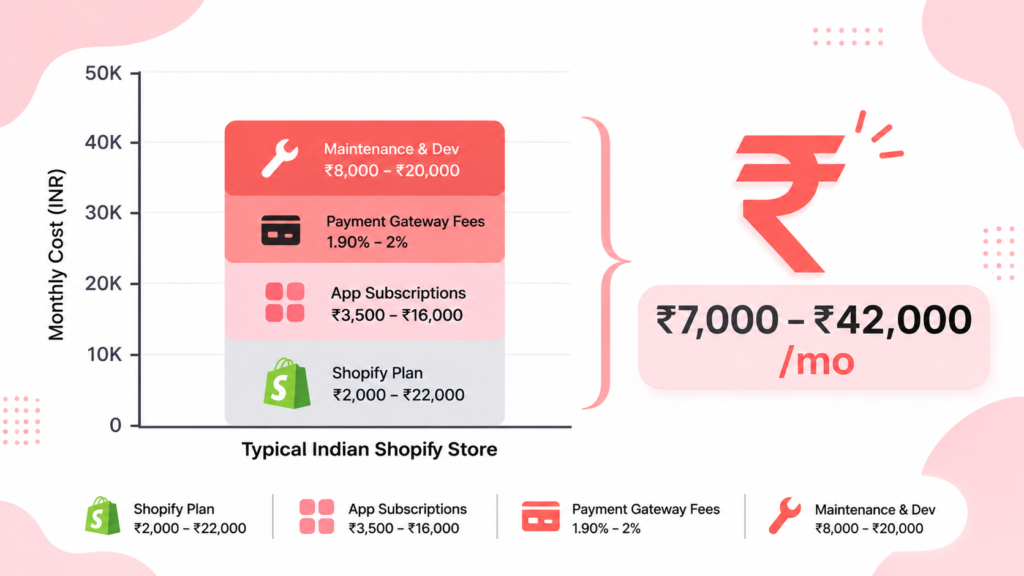
Most Shopify apps charge monthly subscriptions. Here’s what a typical Indian D2C store’s integration stack looks like:
| Integration | Tool | Monthly Cost |
| Payment Gateway | Razorpay | 2% per transaction (no monthly fee) |
| Shipping | Shiprocket | Free–₹799/mo (platform fee; per-shipment courier charges extra) |
| Interakt | ₹2,499/mo+ | |
| Reviews | Judge.me | Free–₹1,250/mo |
| Accounting | Zoho Books | ₹899, ₹1,799, ₹3,599/mo (Standard/Pro/Premium) |
| Email Marketing | Klaviyo / WebEngage | Free–₹8,500/mo (scales with contact list size) |
| SEO | Basic SEO app | Free–₹1,500/mo |
| Total (Typical) | ₹3,500–₹16,000/mo |
This doesn’t include Shopify’s own plan cost (₹2,000–₹22,000/mo depending on plan). So the total monthly tech cost for a properly integrated Indian Shopify store typically falls between ₹5,500 and ₹38,000.
Custom Integration Development Costs
When off-the-shelf apps don’t cut it, custom development enters the picture:
| Integration Type | Typical Cost Range |
| Tally/ERP connector (middleware) | ₹40,000–₹1,50,000 |
| Custom payment gateway setup | ₹15,000–₹50,000 |
| Marketplace sync (Flipkart/Amazon) | ₹30,000–₹1,00,000 |
| Custom shipping logic | ₹20,000–₹75,000 |
| Webhook-based automations | ₹10,000–₹40,000 per workflow |
| Full integration audit + fixes | ₹25,000–₹75,000 |
These are one-time development costs. Most custom integrations also need occasional shopify maintenance services as APIs change or business requirements evolve.
Agency vs. Freelancer vs. DIY
Another cost factor is who does the integration work:
DIY (store owner): Best for simple app store integrations. Free in terms of labour cost, but time-intensive. The risk is misconfiguration. We’ve seen stores lose orders because payment webhooks weren’t set up correctly, or shipping integrations were syncing inventory in the wrong direction.
Freelancer: Rates vary wildly in India, from ₹500/hr to ₹2,000/hr. Good freelancers handle integration well, but availability can be inconsistent. Troubleshooting at 11 PM during a sale? That’s where freelancer arrangements often break down.
Shopify Agency: Higher upfront cost but you get a team, documentation, and accountability. Most Indian Shopify agencies charge project-based pricing (starting from ₹30,000–₹50,000) or hourly rates (₹1,000–₹2,500/hr). The advantage is having developers who’ve already built the same integration for multiple stores, so setup is faster and edge cases are anticipated.
The Hidden Cost Most Stores Ignore
The biggest integration cost isn’t the development or the subscription. It’s the cost of NOT integrating, or integrating poorly.
A store doing 200 orders/day with manual order processing, manual accounting entries, and no WhatsApp automation is burning 4–6 hours of team time daily. At ₹150/hr (a realistic cost-to-company for an ops team member), that’s ₹18,000–₹27,000/month in manual labour that proper integrations would eliminate.
Add in the cost of overselling (cancelled orders + refund processing), missed COD verification (high RTO rates), and delayed customer responses (lost repeat customers), and the numbers get much larger.
Common Shopify Integration Mistakes to Avoid
After setting up integrations for dozens of Indian D2C stores, we’ve seen the same mistakes repeat. Here are the ones that cost real money.
Installing Too Many Apps Too Early
New store owners often install 15–20 apps before they’ve made their first sale. Each app adds JavaScript to your storefront, and loads on every page. The result? A store that takes 6–8 seconds to load, which kills your conversion rate before anyone sees your products.
Start with the essentials: payment gateway, shipping, and WhatsApp. Add other integrations as you actually need them, not because a “best Shopify apps” listicle told you to.
Not Testing Payment Flows End-to-End
This one seems obvious, but we’ve inherited stores where the payment gateway was “integrated” but no one had actually placed a test order using every payment method. UPI works but card payments fail. Net banking redirects to a broken page. The gateway is in test mode and no one noticed.
Always run a complete test order through every payment method your gateway supports. Use Razorpay’s test mode, place actual ₹1 orders, and verify that order status updates, inventory deductions, and confirmation messages all trigger correctly.
Ignoring Webhook Failures
Webhooks fail silently. If Shopify sends an order notification to your shipping platform and that platform’s server is down, the order doesn’t get processed. There’s no error message on your Shopify dashboard. The order just sits there.
Set up monitoring for critical webhooks. Most platforms have webhook delivery logs. Check them weekly. For high-volume stores (500+ orders/day), build alerts for webhook delivery failures so your team catches issues within minutes, not days.
Skipping COD Verification
Running COD without verification in India is essentially accepting that 15–25% of your COD orders will return undelivered. Some of those are genuine delivery failures. Many are fake orders, wrong addresses, or impulse purchases the customer changed their mind about.
Implement at minimum a WhatsApp-based COD confirmation. If the customer doesn’t confirm within 2 hours, cancel the order before it ships. It costs almost nothing to set up and can save lakhs per month in wasted shipping costs.
Not Syncing Inventory Across Channels
If you’re selling on Shopify and Amazon India, your inventory needs to be synced in real time. Not once a day. Not manually. In real time.
Without this, a busy sale day on Amazon can sell out stock that’s still showing as available on your Shopify store. The orders come in, you can’t fulfil them, and now you’re dealing with cancellations, refund processing, and negative reviews on both platforms.
Treating Integration as a One-Time Setup
Apps update. APIs change. Shopify releases new versions. That shipping integration that worked perfectly for 6 months suddenly starts throwing errors because the courier partner changed their API endpoints.
Integrations need periodic checks. Someone on your team (or your agency) should review integration health monthly: check webhook delivery rates, verify data sync accuracy, review app performance impact on site speed, and test critical flows after any app update.
Frequently Asked Questions
Yes, and there are now a couple of Shopify apps that handle this. Import2Tally (Free for 100 transactions/mo, $9/mo for 500, $29/mo for 1,500) and Fatafat Tally ERP (Free for 100 orders/mo) can sync orders, invoices, and GST data between Shopify and Tally Prime. For stores under 100 orders/day, these work well enough. But for higher volumes or complex setups where you need custom GST rules, multi-location inventory sync, or payment reconciliation across multiple gateways, you will still need custom middleware that pulls order data via Shopify’s API and converts it into Tally’s XML import format. Expect ₹15,000–₹50,000 for a basic connector setup, or ₹50,000–₹1,50,000 for a full custom middleware build with invoice automation and payment reconciliation.
Razorpay is the most widely used payment gateway for Indian Shopify stores. It supports UPI, cards, net banking, and wallets with 2% transaction fees and solid documentation. If transaction volume is your priority, Cashfree offers the lowest rates at 1.90%. PayU is a good alternative if you need EMI and multi-currency support.
Start with 4-6 essential apps: payment gateway, shipping/logistics, WhatsApp communication, one reviews app, and a basic SEO tool. Add more only when you have a specific, proven need. Each app adds code to your storefront, and stores with 15+ apps almost always have page speed problems. We’ve seen stores drop from 3-second to 8-second load times just from unnecessary app bloat.
No. As of now, Shopify Payments is not supported in India. Indian stores must use third-party payment gateways like Razorpay, Cashfree, PayU, or Paytm Payment Gateway. This is one of the first things to set up when launching a Shopify store in India.
Implement a COD verification flow using WhatsApp or IVR. When a COD order is placed, the customer automatically receives a confirmation message. If they don’t confirm within a set timeframe (usually 1–2 hours), the order is cancelled before shipping. Additionally, restrict COD availability by pin code (block high-RTO areas), set minimum cart values for COD eligibility, and offer small prepaid incentives to shift customers toward prepaid payments.
Shopify offers both APIs for custom integrations. REST API is simpler and works well for basic operations like reading order data or updating products. GraphQL API is more efficient for complex queries because it lets you request exactly the data you need in a single call instead of multiple requests. For most Indian D2C stores, the choice depends on the developer’s familiarity. Both get the job done. GraphQL is generally recommended for new custom integrations because of better performance and Shopify’s increasing focus on it.
Not directly. Flipkart doesn’t offer a native Shopify integration. You need middleware like Unicommerce or Browntape to sync inventory, orders, and product listings between Shopify and Flipkart. Amazon India has a more straightforward Shopify integration through apps like CedCommerce, but Flipkart requires this additional layer.
Monthly app subscriptions typically run ₹5,000–₹20,000 depending on your stack. Beyond that, budget for periodic maintenance. APIs change, apps update, and business requirements evolve. A quarterly integration health check (reviewing webhook delivery, data sync accuracy, and site speed impact) is good practice. If you’re on an agency retainer, this usually falls within standard maintenance plans (₹8,000–₹20,000/month for minor updates at TBP).
Conclusion:
Shopify gives you the storefront. Integrations give you the business.
Without them, every order creates manual work, every channel operates in isolation, and every growth spike exposes another operational gap. With the right stack, orders flow from checkout to delivery to accounting without anyone touching a spreadsheet.
The Indian market makes this harder. Shopify Payments doesn’t work here. Tally doesn’t connect natively. COD needs its own verification layer. WhatsApp replaces email as the primary channel. Each one needs a deliberate integration decision, not a default setting.
If you’re launching a new Shopify store in India, start with the core four: payment gateway, shipping, WhatsApp, and accounting. Get those working cleanly before adding anything else. If you’re already running a store and things feel held together with duct tape, an integration audit is the fastest way to find what’s leaking.