
Your Shopify store launched. Orders started coming in. Everything looked great.
Then one morning, the checkout stopped working. A theme update broke your product page layout. An app you forgot about started throwing errors that slowed your site to a crawl. And you had no idea any of it was happening until a customer sent you a screenshot.
This is what happens when a Shopify store runs without maintenance.
Most store owners think of maintenance as something you do when things break. But by the time something visibly breaks on a live Shopify store, the damage is already done. Lost sales, dropped rankings, frustrated customers who quietly leave and never come back.
Shopify store maintenance is not a one-time cleanup. It is an ongoing, structured process that keeps your store technically healthy, commercially functional, and ready to handle whatever comes next, whether that is a traffic spike during a Diwali sale or a Shopify platform update that changes how your theme renders.
What Is Shopify Store Maintenance
Shopify Store Maintenance is the ongoing work of keeping your store technically sound, visually consistent, and commercially functional after launch. It covers everything from theme updates and app compatibility checks to speed optimization, security monitoring, and content accuracy.
Think of it this way: Shopify gives you the platform. Maintenance keeps your store running well on that platform.
But here is where most store owners get confused. They assume Shopify handles everything because it is a hosted platform. And Shopify does handle a lot. But not everything.
What Shopify handles for you:
- Server hosting and uptime (Shopify guarantees 99.99% uptime across all plans)
- SSL certificates and automatic renewal
- PCI DSS compliance for payment processing
- Core platform security patches and updates
- CDN-based content delivery for global speed
- Automatic Shopify platform version upgrades
What Shopify does NOT handle (and what falls under maintenance):
- Theme updates, customizations, and compatibility after Shopify version changes
- App updates, conflicts, and performance issues caused by third-party apps
- Product page content, images, SEO metadata, and structured data accuracy
- Site speed issues caused by unoptimized images, excessive apps, or custom code
- Broken links, 404 errors, and redirect management
- Checkout flow testing across devices and payment methods
- Backup of theme files and store configuration (Shopify does not offer automatic full-store backups)
- Analytics tracking accuracy (GA4, Meta Pixel, conversion events)
The gap between what Shopify manages and what your store actually needs is exactly where maintenance lives. And the wider that gap grows, the more problems start stacking up, often silently, until something customer-facing breaks.
Maintenance vs Support vs One-Time Fix: What’s the Difference?
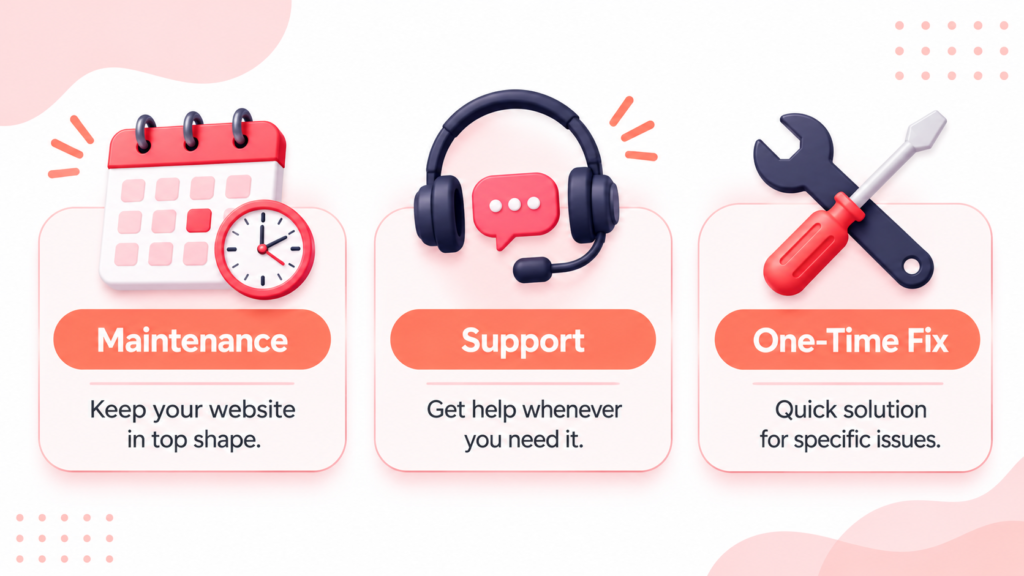
These three terms get used interchangeably in the Shopify ecosystem, but they mean very different things. Understanding the difference matters because it directly affects what you are paying for and what you should expect.
Maintenance is proactive, scheduled, and ongoing. It is the work that prevents problems before they happen. Regular theme updates, speed checks, app audits, broken link scans, mobile responsiveness testing, security reviews. Maintenance happens on a fixed schedule, weekly, monthly, or quarterly, regardless of whether something is visibly broken. The goal is to keep the store healthy so that nothing breaks in the first place.
Support is reactive. It kicks in when something goes wrong and you need someone to fix it. Your checkout is not loading. A discount code is A discount code applied incorrectly. A customer cannot complete a purchase on mobile. Support is about responding to issues as they come up, usually governed by an SLA with defined response and resolution times. Good support is fast and reliable, but it only activates after the problem has already occurred.
One-time fix is exactly what it sounds like. A single, scoped task with a clear start and end. Fixing a broken Liquid template. Migrating a theme from Vintage to Online Store 2.0. Setting up a new payment gateway. Adding a custom section to your homepage. You pay once, the work gets done, and there is no ongoing engagement.
Here is why this distinction matters for your budget:
If you only invest in support, you are essentially waiting for things to break and then paying to fix them. That is more expensive over time than maintenance, which prevents most of those issues from ever reaching the support stage.
If you only do one-time fixes, you are patching problems one at a time without any system to catch the next one. It works until it does not.
The most cost-effective approach for any store doing consistent revenue is a maintenance plan that includes basic support coverage. That way, scheduled work prevents most issues, and when something unexpected does come up, you have a team that already knows your store and can jump in without a cold start.
What’s Actually Included in Shopify Store Maintenance
Maintenance is a broad word, and every agency or freelancer defines it differently. Some call a monthly speed check “maintenance.” Others bundle full development hours into the same label. So before you sign up for any plan, you need to know what should actually be in scope.
Here is what a solid Shopify maintenance plan typically covers:
1. Theme updates and compatibility checks
Shopify releases platform updates regularly, and your theme needs to stay compatible. This includes testing your theme after every Shopify version update, checking for deprecated Liquid tags, and making sure custom sections still render correctly across devices.
2. App management and audit
Apps are one of the biggest sources of store problems. Maintenance includes reviewing installed apps for updates, checking if any apps have been deprecated or abandoned by their developers, removing unused apps, and testing for conflicts between apps (especially checkout and cart-related ones).
3. Speed monitoring and optimization
Page speed directly affects conversion rate and SEO rankings. Ongoing maintenance tracks your Core Web Vitals, optimizes new images as they are uploaded, identifies scripts or apps that slow down your store, and implements lazy loading or code-level fixes where needed.
4. Security and backup management
While Shopify handles platform-level security, your store-level security is your responsibility. This includes maintaining backups of your theme code and configuration, monitoring for unauthorized access or suspicious admin activity, ensuring your staff accounts have appropriate permissions, and reviewing third-party app access tokens.
5. Content and product updates
Product pages need regular attention. Prices change, inventory status shifts, descriptions need updating, and seasonal collections need to be published or archived. Maintenance ensures your catalog stays accurate and that outdated content does not confuse customers or hurt your search rankings.
6. SEO health monitoring
This is not a full SEO overhaul. It is the technical hygiene that keeps your existing rankings stable. Checking for broken links, monitoring 404 pages, verifying that canonical tags are correct, ensuring your sitemap reflects your live pages, and keeping structured data (product schema, breadcrumb schema) valid.
7. Checkout and payment testing
Your checkout should be tested regularly, especially after any app update, theme change, or Shopify platform update. This includes testing all active payment gateways, verifying that discount codes and automatic discounts work correctly, and confirming that tax and shipping calculations are accurate for your selling regions.
8. Mobile responsiveness checks
Over 70% of Shopify traffic in India comes from mobile. Maintenance includes regular testing on actual devices (not just browser emulators) to catch layout issues, broken navigation, slow-loading elements, or tap targets that are too small on mobile screens.
9. Analytics and tracking review
GA4 events, Meta Pixel events, and conversion tracking break more often than most store owners realize, especially after app installs or theme changes. Maintenance includes periodic verification that your tracking is firing correctly and that the data in your analytics dashboard actually matches what is happening in your store.
10. Bug fixes and issue resolution
Small bugs add up. A broken filter on mobile. A product variant that does not display its image. A collection page that shows out-of-stock items at the top. Maintenance catches these before customers notice them.
What’s Usually NOT Included in Maintenance
This is where misunderstandings happen. Store owners often expect their maintenance plan to cover things that are actually separate projects. Knowing what falls outside standard maintenance helps you avoid surprise invoices and mismatched expectations.
Most maintenance plans do NOT include:
- Full store redesigns or theme rebuilds. A maintenance team will update and patch your existing theme. They will not redesign your entire store from scratch. That is a separate project with its own scope, timeline, and budget.
- Custom feature development. If you want a custom product configurator, a loyalty program integration, or a completely new checkout flow, that is development work, not maintenance.
- Full Shopify SEO campaigns. Maintenance covers technical SEO hygiene (broken links, schema, sitemap). It does not include keyword research, content strategy, link building, or ongoing SEO content creation.
- Content writing. Maintenance keeps your existing content accurate and updated. Writing new blog posts, product descriptions from scratch, or landing page copy is content work, not maintenance.
- Third-party platform integrations from scratch. Connecting your store to a new ERP, CRM, or fulfillment system is an integration project, not a maintenance task.
- Paid advertising management. Running and optimizing your Google Ads or Meta Ads campaigns is not part of store maintenance, even if tracking and pixel setup are.
The line is straightforward: maintenance keeps what exists working well. Building something new is a separate engagement.
Shopify Maintenance Checklist: Weekly, Monthly, Quarterly, Annual
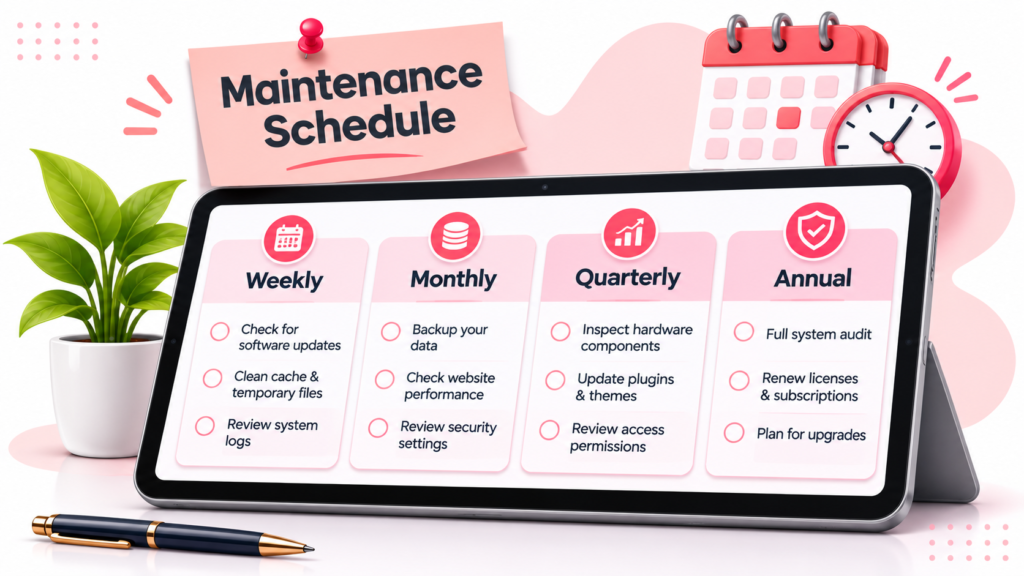
Having a maintenance checklist removes the guesswork. Instead of reacting to problems, you work through a structured schedule that covers every critical area of your store at the right frequency.
Here is a practical checklist organized by time interval. Not every store needs every item on this list, but this gives you a solid baseline to build from.
Weekly Tasks
- Test checkout flow on mobile and desktop (place a test order, apply a discount code, verify confirmation email)
- Check for broken links or 404 errors on key pages (homepage, top collections, bestseller product pages)
- Review Google Analytics and Shopify Analytics for unusual drops in traffic, conversion rate, or average order value
- Scan for new app updates and read changelogs before updating
- Verify that inventory status is accurate (out-of-stock products should not appear as available)
- Quick visual check on mobile: does the homepage, navigation, and cart look correct on a real phone?
Monthly Tasks
- Run a full site speed test (Google PageSpeed Insights, GTmetrix) and compare against previous month’s scores
- Review and optimize any new images uploaded during the month (compression, alt text, proper dimensions)
- Audit installed apps: remove any that are unused, test for conflicts, check if any have been deprecated
- Verify all tracking is firing correctly (GA4 events, Meta Pixel, Google Ads conversion tags)
- Test all active payment gateways with a small test transaction
- Review 404 error logs and set up redirects for any high-traffic dead pages
- Check that email flows (order confirmation, shipping updates, abandoned cart) are working and content is current
- Back up your current theme code (download the theme file from Shopify admin)
Quarterly Tasks
- Full theme compatibility review: test your theme against the latest Shopify platform version
- Comprehensive mobile responsiveness audit across at least 3 different devices and screen sizes
- Review site structure and navigation: are collections organized logically? Are there orphan pages with no internal links?
- SEO health check: validate structured data (product schema, breadcrumb schema), review canonical tags, check sitemap accuracy
- Security review: audit staff account permissions, review third-party app access, change admin passwords if needed
- Performance benchmark: compare current Core Web Vitals (LCP, FID/INP, CLS) against last quarter’s numbers
- Review and clean up discount codes (remove expired ones, check for codes being shared publicly that should not be)
Annual Tasks
- Full shopify store audit: a comprehensive review of every technical, design, and content element of your store (this is a deeper exercise than quarterly checks)
- Evaluate your Shopify plan: are you on the right plan for your current order volume and feature needs?
- Review your app stack holistically: do you still need every app you are paying for? Are there better alternatives?
- Assess whether your current theme still meets your business needs or if a theme upgrade or migration should be planned
- Review your maintenance provider’s performance: response times, issue resolution quality, communication
- Plan your maintenance budget for the coming year based on store growth, expected traffic, and seasonal campaigns
You do not need to do all of this yourself. The point of this checklist is to know what should be happening and to verify that whoever handles your maintenance, whether it is you, a freelancer, or an agency, is actually covering these bases.
Shopify Maintenance During Sale Season
Sale seasons are when most Shopify stores push the hardest and when most maintenance failures become painfully visible. Diwali sales, Republic Day deals, end-of-season clearances. These events drive concentrated traffic spikes, and your store needs to be ready for them before the first ad goes live.
Here is what sale season maintenance looks like in practice:
2 – 4 weeks before the sale:
- Freeze all non-essential theme changes. No new custom sections, no major app installs, no layout experiments. This is a code freeze for your storefront.
- Load test your store. If you are expecting 5x your normal traffic, you need to know how your store handles that before it actually happens. Test your checkout with multiple simultaneous sessions.
- Audit your discount and promotion setup. Test every discount code, automatic discount, and bundle offer on staging or a test order. Verify that discounts stack correctly (or do not stack, if that is the intent).
- Check your app stack for anything that might slow down checkout under load. Remove or disable apps that are non-essential during the sale period.
- Verify your hosting and CDN. While Shopify handles server infrastructure, check that any external services you rely on (reviews apps, search apps, recommendation engines) can handle increased load.
- Confirm that all tracking and attribution is set up correctly for your sale campaigns. If your Meta Pixel or GA4 conversion events break mid-sale, you lose campaign optimization data you cannot get back.
During the sale:
- Monitor your store in real-time. Have someone checking checkout success rates, page load times, and error logs at least every few hours during peak periods.
- Hire Shopify Developer on standby. If something breaks during a live sale, you need someone who can jump in within minutes, not hours. This is where your SLA matters.
- Watch for inventory sync issues. If you sell across multiple channels (Shopify, Amazon, marketplaces), inventory discrepancies during high-volume periods can lead to overselling.
- Do not push any code changes during the sale unless something is actively broken. Even a small CSS fix can introduce unexpected behavior under high traffic.
After the sale:
- Run a full post-sale check. Test checkout, review all discount codes to deactivate expired ones, check for display issues caused by the sale banners or countdown timers you added.
- Review performance data. How did page speed hold up? Were there checkout failures? Did any apps crash? This post-mortem gives you a roadmap for what to fix before the next sale.
- Clean up. Remove sale-specific banners, pop-ups, and promotional sections. Revert any temporary theme changes. Update product pricing and collection sorting to reflect your regular catalog.
The brands that handle sale seasons smoothly are the ones that treat pre-sale maintenance as part of their campaign plan, not an afterthought.
7 Signs Your Shopify Store Needs Maintenance Right Now
Some maintenance needs are obvious. Your site goes down, and you know you have a problem. But most maintenance issues show up quietly, through metrics that slowly decline or customer complaints that trickle in one at a time. Here are seven signals that your Shopify store is overdue for maintenance.
1. Your page speed scores are dropping without any obvious reason
You have not changed anything major on your store, but your PageSpeed scores are lower than they were three months ago. This usually happens because of app bloat (apps add scripts that accumulate over time), unoptimized images from new product uploads, or Shopify platform updates that your theme has not been adjusted for. If your LCP is creeping above 2.5 seconds or your mobile performance score is below 50, it is time for a maintenance review.
2. Customers are reporting checkout issues you cannot reproduce
A customer says they could not complete their order. You test it yourself and it works fine. This is one of the most common and most dangerous maintenance signals. The issue might be device-specific, browser-specific, or triggered by a specific combination of cart items and discount codes. If you are hearing about checkout problems even occasionally, it means more customers are experiencing them silently and just leaving.
3. Your bounce rate is climbing on key pages
When your homepage, collection pages, or top product pages show a steady increase in bounce rate over 2 – 3 months, something is wrong. It could be slow load times, broken layouts on certain screen sizes, outdated content, or pop-ups that are interfering with the user experience. The numbers are telling you that visitors are arriving and immediately leaving.
4. You have apps installed that you do not recognize or no longer use
Open your Shopify admin, go to Apps, and count how many are installed. Now count how many you actively use. If there is a gap, those unused apps are still loading scripts on your storefront, potentially slowing your site down and creating security vulnerabilities. Some apps continue to run background processes even when you think they are inactive.
5. Your theme has not been updated in over 6 months
Shopify’s platform evolves constantly. If your theme has not been updated or at least reviewed for compatibility in the last two quarters, you are likely running on code that does not take advantage of newer Shopify features and may eventually conflict with platform updates. This is especially true if you are still on a Vintage theme and have not migrated to Online Store 2.0.
6. Your structured data has errors in Google Search Console
If Google Search Console is showing structured data errors or warnings for your product pages, your store’s visibility in search results is being affected right now. Invalid product schema, missing price or availability markup, or broken breadcrumb data means your products may not show rich results (star ratings, price, availability) in Google, which directly impacts click-through rates.
7. You cannot remember the last time someone tested your store end-to-end
If nobody has gone through your store as a customer in the last 30 days, browsing products, adding to cart, applying a discount, completing checkout, checking the confirmation email, then you have no idea whether your store is actually working the way it should. This is the most basic maintenance check, and it is the one most store owners skip.
How Much Does Shopify Maintenance Cost in India
This is the section most store owners search for first, so let us get straight to the numbers.
Shopify maintenance costs in India vary widely depending on the scope of work, the type of provider, and how complex your store is. A simple store with 50 products and a standard theme needs far less maintenance than a Shopify Plus store with custom integrations, multiple sales channels, and thousands of SKUs.
Here is a realistic breakdown of what you can expect:
Freelancer rates for Shopify maintenance:
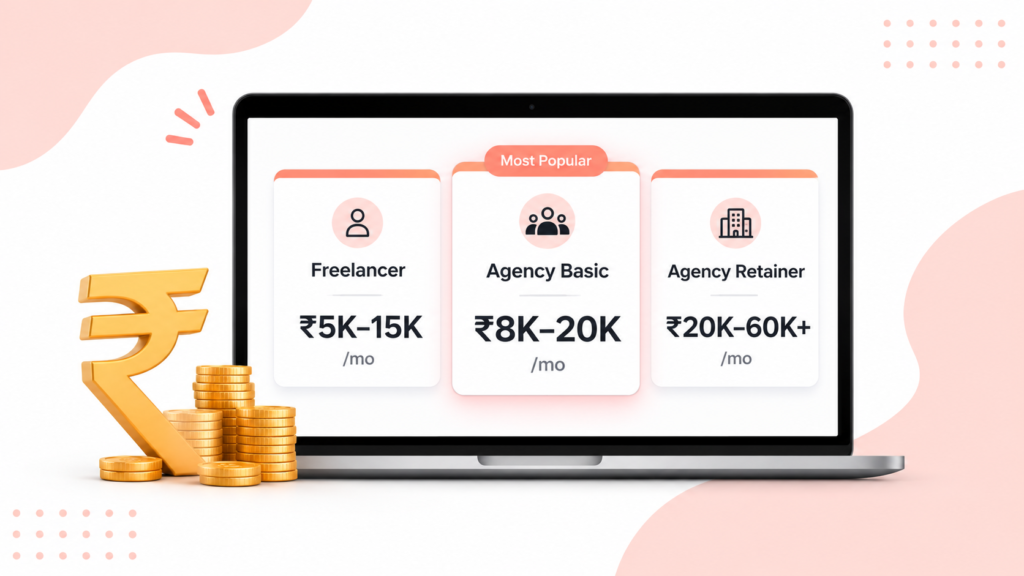
- Hourly: ₹500 – ₹1,500 per hour
- Monthly retainer: ₹5,000 – ₹15,000 per month
- Scope: basic tasks like product updates, minor bug fixes, theme tweaks, and image uploads. Limited availability, usually no SLA.
Agency rates for Shopify maintenance:
- Minor updates package: ₹8,000 – ₹20,000 per month (covers basic checks, minor fixes, speed monitoring, app updates)
- Active retainer: ₹20,000 – ₹60,000+ per month (dedicated hours, priority support, speed optimization, security monitoring, quarterly audits)
- Annual plans: around ₹1,00,000 per year for comprehensive coverage
- Shopify Developer Hourly Rate: ₹1,000+ per hour for ad-hoc work outside retainer scope
What affects your maintenance cost:
- Store complexity. A single-product D2C store costs less to maintain than a multi-collection store with custom Liquid sections, third-party integrations, and multiple payment gateways.
- Number of apps. More apps mean more potential conflicts, more updates to manage, and more testing required.
- Traffic volume. Higher traffic stores need more frequent monitoring and faster response times.
- Customization level. A heavily customized theme requires more careful maintenance than a store running a standard theme with minimal changes.
- SLA requirements. If you need guaranteed response times (say, under 4 hours for critical issues), that level of commitment costs more than general “we will get to it” support.
What about Shopify’s own costs?
Remember, maintenance costs are on top of your Shopify subscription. Your Shopify Basic plan (₹1,994/month), Shopify plan (₹7,447/month), or Advanced plan (₹30,164/month) covers the platform itself. Maintenance is the operational cost of keeping your store healthy on that platform.
A note on “free maintenance” offers:
Some agencies offer “free maintenance” as part of a store build package. This typically means 1 year of basic technical support included with the project, covering minor bug fixes and small tweaks, not comprehensive maintenance. This is standard practice for project-based engagements, but it is important to understand that this is limited support, not a full maintenance plan. Once that period ends, or if your needs exceed basic support, you will need a dedicated maintenance engagement.
How to Read a Maintenance SLA
An SLA (Service Level Agreement) defines what your maintenance provider commits to in terms of response time, resolution time, and scope of work. If you are paying for a maintenance plan and you do not have an SLA, you do not actually have a plan. You have a loose arrangement.
Here is what to look for when reviewing a maintenance SLA:
1. Response time vs resolution time
These are two different things, and confusing them is one of the most common mistakes store owners make.
Response time is how quickly the provider acknowledges your issue. If the SLA says “4-hour response time,” it means someone will get back to you within 4 hours to confirm they have received your request and are looking into it.
Resolution time is how long it takes to actually fix the problem. This depends on the complexity of the issue, so most SLAs define resolution time by priority level rather than giving a flat guarantee.
2. Priority levels
A well-structured SLA categorizes issues by severity:
- P1 (Critical): Store is down, checkout is broken, payment processing has failed, or a security breach is detected. These are revenue-stopping issues that need immediate attention.
- P2 (High): Major functionality is degraded but the store is still operational. A product page is not loading correctly, a key app integration has stopped working, or mobile layout is severely broken.
- P3 (Medium/Low): Non-urgent issues. A minor display inconsistency, a content update request, a question about how something works.
3. Scope and hour limits
Most maintenance SLAs include a set number of hours per month. If your plan includes 10 hours of maintenance per month, anything beyond that is billed separately. Make sure the SLA clearly defines what counts toward those hours and what does not. Routine scheduled maintenance (the weekly and monthly checklist items) should be included in the base plan, not counted against your support hours.
4. Communication channels and escalation
How do you submit a request? Email, Slack, WhatsApp, a ticketing system? The SLA should specify the official communication channel. It should also define an escalation path: who you contact if your issue is not being handled within the committed timeframe.
5. Exclusions and what costs extra
Every SLA has boundaries. Read the exclusions carefully. Common exclusions include new feature development, full redesigns, third-party app issues that require the app developer’s involvement, and content creation. If something is excluded from your SLA and you need it, that becomes a separate project or additional billing.
6. Business hours vs 24/7 coverage
Most maintenance plans in India operate on business hours (Monday to Saturday, 10 AM – 7 PM IST). If your store serves international customers and you need weekend or after-hours coverage, that is a higher tier of service with a higher cost. Make sure the SLA specifies this clearly so you are not expecting midnight responses on a standard plan.
The SLA is your contract with reality. If it is not written down with specific numbers, it is a promise, not a commitment.
DIY vs Freelancer vs Agency: Which One Fits Your Store

There is no single right answer here. The best maintenance setup depends on your store’s complexity, your technical skills, your budget, and how much risk you are comfortable with.
DIY (Do It Yourself)
Best for: new stores with low traffic, simple setups, and store owners who are comfortable with basic Shopify admin tasks.
What you can realistically handle yourself: product updates, image uploads, basic content changes, installing and updating apps from the Shopify App Store, downloading theme backups, running speed tests with free tools, and testing your checkout periodically.
What you will struggle with: Liquid code issues, theme compatibility debugging after Shopify updates, app conflict resolution, structured data validation, Core Web Vitals optimization, and anything that requires touching code. If something breaks at the code level, you will need to bring in help anyway, and doing it urgently costs more than having someone on retainer.
Cost: free (your time only), but time has a real cost. If you are spending 5 – 10 hours a month on maintenance tasks instead of growing your business, that is a hidden expense.
Freelancer
Best for: small to mid-size stores that need technical help but do not have enough ongoing work to justify an agency retainer.
What a good freelancer offers: code-level fixes, theme updates, speed optimization, app troubleshooting, and periodic audits. Many Shopify freelancers work on an hourly basis or a small monthly retainer.
The trade-off: freelancers are individuals. If your freelancer is busy with another client, sick, or unavailable during your busiest season, you have no backup. There is usually no SLA, no guaranteed response time, and no team to escalate to. You are dependent on one person’s availability and reliability.
Cost: ₹500 – ₹1,500 per hour, or ₹5,000 – ₹15,000 per month on retainer.
Agency
Best for: established stores doing consistent revenue, stores with complex setups, Shopify Plus stores, and brands that cannot afford downtime during critical sales periods.
What an shopify development agency offers: a team (not a single person), defined SLAs with response time commitments, structured maintenance schedules, quarterly audits, priority support during sale seasons, and the ability to handle both maintenance and development work when needed.
The trade-off: agencies cost more than freelancers. And not every agency is worth its retainer. Some agencies treat maintenance as a low-priority afterthought, assigning junior resources or bundling it with generic support. The right agency is one that treats your store as a product they are responsible for, not just a ticket queue.
Cost: ₹8,000 – ₹60,000+ per month depending on scope and SLA level.
How to decide:
If your store makes less than ₹2 lakhs per month in revenue and has a simple setup, DIY with an occasional freelancer call makes sense. If you are between ₹2 – ₹10 lakhs per month, a freelancer on a small retainer or a basic agency plan is the sweet spot. If you are above ₹10 lakhs per month or running a Shopify Plus store, an agency retainer with a clear SLA is worth every rupee. The cost of a few hours of unplanned downtime during a sale season is almost always higher than the annual cost of a maintenance plan.
How to Plan Your Shopify Maintenance (Step by Step)
A maintenance plan is not something you buy off the shelf. It is something you build based on your store’s specific needs, traffic patterns, and growth stage. Here is how to create one that actually works.
Step 1: Audit your current store health
Before planning maintenance, you need to know where you stand. Run a baseline Shopify audit covering site speed, broken links, app inventory, mobile responsiveness, checkout functionality, and SEO health. This gives you a starting point and helps you prioritize what needs immediate attention versus what can be scheduled.
Step 2: Identify your critical pages and flows
Not every page on your store carries equal weight. Your homepage, top 10 product pages, main collection pages, cart, checkout, and post-purchase pages are your critical path. These are the pages that directly generate revenue, and they should be tested and monitored more frequently than informational pages like your About page or blog.
Step 3: Set your maintenance frequency
Use the checklist from the earlier section as a starting point, but adjust based on your store’s activity level:
- Stores with daily product updates or frequent content changes need weekly checks.
- Stores with stable catalogs and moderate traffic can operate on a monthly cycle with weekly checkout testing.
- All stores should do quarterly comprehensive reviews regardless of size.
Step 4: Choose your maintenance provider (or decide to DIY)
Based on the DIY vs Freelancer vs Agency comparison, pick the setup that fits your budget and risk tolerance. If you go with a provider, have an explicit conversation about scope, response times, and what is included versus what costs extra.
Step 5: Define your SLA and communication process
Even if you are working with a freelancer, write down the basics: how you report issues, expected response time, who is the point of contact, and what happens during emergencies. This does not need to be a 20-page legal document. A one-page summary with specific numbers is better than a loose promise to handle it.
Step 6: Build a maintenance calendar
Map out your maintenance tasks on an actual calendar. Weekly tasks every Monday morning. Monthly tasks on the first week of each month. Quarterly reviews at the start of each quarter. Pre-sale maintenance 4 weeks before major campaigns. This turns maintenance from a vague intention into a concrete schedule.
Step 7: Set up monitoring and alerts
Do not rely entirely on manual checks. Set up automated monitoring where possible:
- Google Search Console for crawl errors and structured data issues
- Google PageSpeed Insights or a speed monitoring tool for performance regression alerts
- Shopify’s built-in analytics for conversion rate and traffic anomalies
- Uptime monitoring (many free tools available) for downtime alerts
Automated monitoring catches problems between scheduled maintenance windows. It does not replace human review, but it makes sure you are not caught off guard.
Step 8: Review and adjust quarterly
Your maintenance plan should evolve with your store. If you added 500 new products last quarter, your monthly content review scope has changed. If you launched on a new sales channel, that channel’s integration needs to be part of your maintenance checklist. Review your plan every quarter and adjust it based on what actually happened, not what you originally assumed would happen.
Common Shopify Maintenance Mistakes
Maintenance itself can cause problems if done poorly. Here are the mistakes that come up most often, and they are all avoidable.
Updating apps and themes without testing first
This is the number one maintenance mistake. An app update rolls out, and you hit “update” without testing it on a staging environment or at least checking the changelog. Next thing you know, your cart page is broken, your checkout styling is off, or a critical integration has stopped working. Always test updates before applying them to your live store, or at minimum, take a theme backup before updating.
Installing apps to solve problems that do not require apps
Every app you install adds JavaScript to your storefront. Many store owners install apps for things that could be handled with a few lines of custom code or a theme setting adjustment. A countdown timer app. A custom font app. A “back to top” button app. Each one adds weight to your store. Before installing any app, ask whether the same thing can be done with native Shopify features or a small code change.
Ignoring mobile until something breaks
Most store owners check their store on desktop and assume mobile looks fine. It usually does not. Buttons overlap, text overflows containers, images load at desktop dimensions on mobile screens, and pop-ups block the entire viewport on smaller phones. Mobile needs its own testing, on real devices, not just Chrome DevTools.
Treating speed optimization as a one-time task
You optimized your store six months ago and your PageSpeed score was 85. Now it is 62, and you are confused. Speed degrades over time as you add new products (with unoptimized images), install new apps (each adding scripts), and Shopify releases platform updates. Speed optimization is a recurring maintenance task, not a project you complete once.
Not backing up before making changes
Shopify does not offer automatic full-store backups. If you or your developer makes a change that breaks something, and you do not have a backup of your previous theme version, rolling back becomes a manual, time-consuming process. Downloading your current theme before any update takes 30 seconds and can save you hours.
Keeping unused apps installed
That review app you tried for a week and stopped using. It is probably still loading its script on every page of your store. Unused apps are dead weight. They slow your store down, create potential security vulnerabilities, and clutter your admin. If you are not actively using an app, uninstall it. Disabling is not enough for most apps since their code often remains on your storefront even when disabled.
No documentation of what was changed and when
When something breaks, the first question is always: what changed recently. If nobody keeps a log of theme updates, app installs, code changes, and configuration adjustments, debugging becomes guesswork. Even a simple spreadsheet that logs date, what was changed, and who changed it makes troubleshooting dramatically faster.
Frequently Asked Questions
Shopify handles platform-level infrastructure: hosting, SSL, PCI compliance, CDN, and core security patches. Everything else, your theme, apps, content, speed, SEO health, checkout testing, and backups, is your responsibility. The platform stays up, but keeping your store optimized and functional is on you.
At minimum, weekly checkout testing and monthly speed and app reviews. Quarterly comprehensive audits covering theme compatibility, SEO health, security, and performance benchmarks. Stores with higher traffic, frequent product updates, or complex app stacks need more frequent attention.
Yes, for basic tasks like product updates, content changes, image uploads, and app installs. But anything involving Liquid code, theme debugging, speed optimization at the code level, or structured data fixes requires technical skills. Most store owners handle the basics themselves and bring in a freelancer or agency for the technical work.
Maintenance is proactive and scheduled. It prevents problems before they happen through regular checks, updates, and optimization. Support is reactive. It responds to problems after they occur. The most effective approach combines both: a maintenance plan that prevents most issues, with support coverage for the unexpected ones.
Freelancers charge ₹5,000 – ₹15,000 per month for basic maintenance. Agency plans range from ₹8,000 – ₹20,000 per month for minor updates to ₹20,000 – ₹60,000+ per month for active retainers with dedicated hours and SLA coverage. The right budget depends on your store’s complexity, traffic, and how much revenue is at risk if something goes wrong.
Response time commitments by priority level (P1 critical, P2 high, P3 low), resolution time targets, the number of included hours per month, communication channels for reporting issues, escalation procedures, and a clear list of what is included and what is billed separately.
No. Free support typically included with new store builds covers minor bug fixes and small tweaks during the first year after launch. It is not a full maintenance plan. It does not include scheduled audits, speed optimization, quarterly reviews, or proactive monitoring. Once the support period ends, or if your needs go beyond basic fixes, you need a dedicated maintenance engagement.
When maintaining your store takes more than 5 – 10 hours of your time per month, when you encounter issues you cannot diagnose yourself, when your store’s revenue has grown to the point where downtime costs more than a maintenance plan, or when you are heading into a major sale season and need reliable, fast support on standby.
Conclusion
Nobody opens a Shopify store excited about maintenance. But maintenance is what keeps everything else working. Your ads bring traffic. Your products close the sale. Your brand earns loyalty. None of that holds up if the store underneath it breaks.
And it does not need to be complicated. Start with three things: test your checkout every week, check your speed every month, run a full review every quarter. That alone puts you ahead of most stores.
If your store has grown to the point where you need a team that knows Shopify deeply and understands how Indian D2C brands run, a good maintenance partner is not a cost. It is protection for the revenue you already have.