
Introduction: Why This Guide, Why Now
India’s D2C market is on track to hit $60 billion by 2027. Both the Shiprocket-CII-Praxis study and the 1 Lattice-Sorin analysis converge around this number growing at approximately 38-40% CAGR, which is 3x faster than the broader retail market.
One platform has been consistently dominant in this boom: Shopify. According to Built with data, roughly 80% of India’s top D2C brands run on Shopify, The Derma Co, Minimalist, Sugar Cosmetics, mCaffeine, Plum, Pilgrim, all included.
But there is an important distinction here. Creating a Shopify account and selecting a premium theme that is “store setup.” Shopify development is something else entirely: custom theme building, payment gateway integrations, shipping automation, checkout optimization, speed tuning, and ongoing technical management. This guide covers the development side, specifically in the context of Indian D2C brands.
Who This Guide Is For
New D2C founders launching on Shopify for the first time and need to understand what development involves and what it costs.
Scaling brands (₹10L-₹1Cr+ monthly revenue) need custom development, Shopify Plus evaluation, or performance optimization.
Brands migrating from WooCommerce, Magento, or custom platforms need to understand the migration process, costs, and hidden risks.
What This Guide Covers
What Shopify development actually is, the core services involved, why D2C brands need specialized development, how to choose the right agency or freelancer, a realistic cost breakdown (with Year 1 budget tables), the step-by-step development process, common mistakes to avoid, and 2027 development trends all in India-specific context, with actual INR numbers.
What Is Shopify Development?
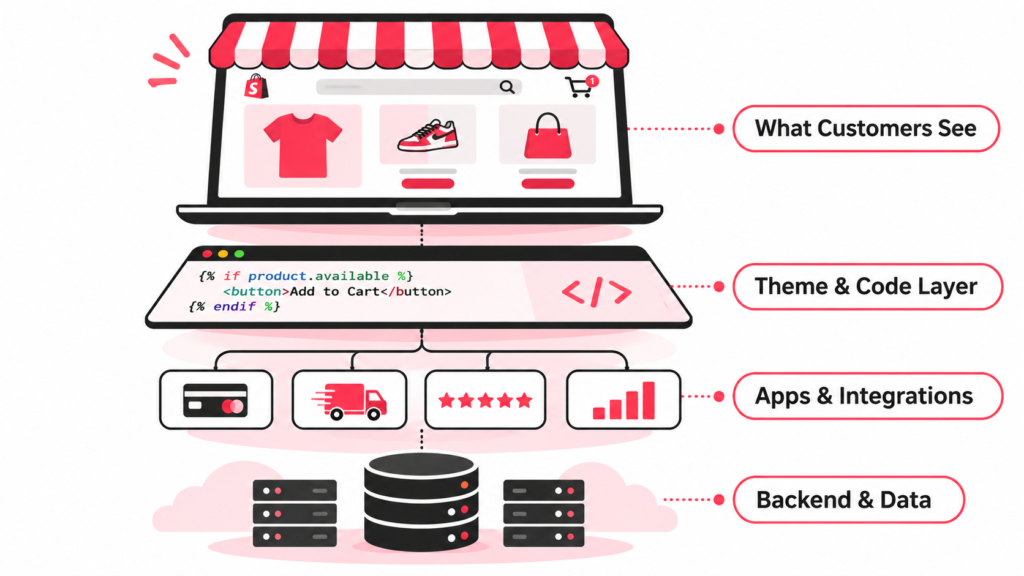
Shopify development means building, customizing, and optimizing an ecommerce store on the Shopify platform beyond basic setup.
Shopify development = the technical work that transforms your Shopify store from a generic template into a high-performing, brand-specific, conversion-optimized D2C storefront.
Shopify Development vs DIY Store Setup
Creating a Shopify account, selecting a theme, uploading products, connecting a payment gateway you can do all of this yourself. Shopify’s admin panel is designed for non-technical users. That is “store setup.”
Shopify development starts when:
- You need a custom design that existing themes cannot deliver
- Product pages need conversion-specific optimization
- Third-party tools (ERP, CRM, custom logistics) need deep integration
- Site speed needs to come under 3 seconds on mobile
- Checkout flow needs India-specific customization (COD logic, pin code validation, UPI flow)
- An existing WooCommerce or Magento store needs migration to Shopify without losing SEO equity
Why Development Matters as Your D2C Brand Grows
From ₹0 to ₹10L monthly revenue, basic setup works fine. But as the brand scales, limitations surface:
Conversion rate stagnation generic theme layouts are not optimized for Indian consumer behavior. Custom product pages, trust signal placement, and checkout optimization can deliver 15-30% conversion improvement.
Speed issues after installing 10+ apps, page load time hits 5-7 seconds. Custom development removes bloat and delivers clean, fast code.
Integration gaps when you are using Shiprocket for shipping, Razorpay for payments, Unicommerce for inventory, and Gupshup for WhatsApp, connecting them seamlessly requires development expertise.
Brand differentiation when five competitors are using the same Dawn or Prestige theme, visual differentiation is impossible without custom development.
When You Need a Developer vs When Basic Setup Is Enough
Basic setup is enough when: Product catalog is small (under 50 SKUs), budget is tight and product-market fit is still being tested, technical complexity is low (simple products, standard checkout).
You need a developer when: Monthly orders are crossing 500+, conversion rate has plateaued, site speed is an issue, custom integrations are needed, or the brand is not standing out visually from competitors.
Core Shopify Development Services for D2C Brands
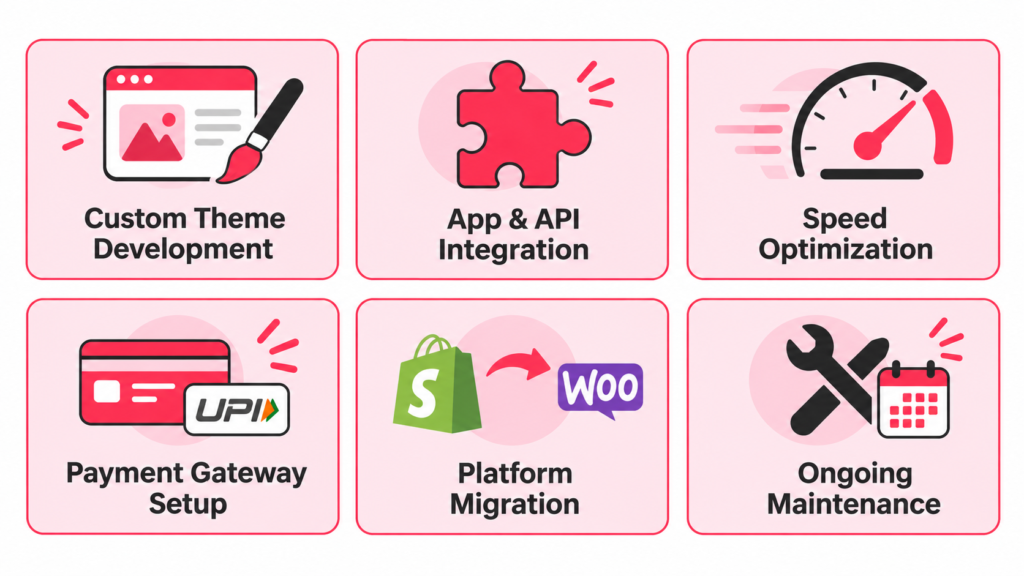
Shopify development for D2C brands in India practically breaks down into these specific services:
Store Setup and India-Specific Configuration
Base-level technical setup but India-specific. This is not just “create an account and pick a theme”:
- Store country set to India, default currency INR
- GST configuration product category-wise tax rates (5%, 12%, 18%, 28%) with GSTIN integration for invoicing
- Shipping zones for India (metro, tier 2, tier 3 different rates, different delivery timelines)
- Payment gateway setup Razorpay, PayU, or Cashfree (Shopify Payments is not available in India)
- COD configuration with pin code-based verification workflow
- Legal pages per Indian consumer protection expectations (return policy, privacy policy, terms of service)
Most freelancers and agencies list this as a standalone service.
Theme Customization and Custom Theme Development
This is where most D2C brands spend the bulk of their development budget. Two approaches:
Theme customization modifying an existing premium theme (Dawn, Prestige, Impulse, Ride) to match your brand. This includes color and typography changes, homepage section rearrangement, product page element modifications, collection page layout adjustments, and mobile optimization. Typical cost: ₹35,000–₹75,000.
Custom theme development building a brand-specific theme from scratch or heavily restructuring Dawn’s codebase. This includes custom section schemas, unique product page layouts, mega menu with collection previews, custom collection filtering, mobile-first responsive design, and brand-specific micro-interactions.Typical cost: ₹50,000–₹2,00,000+.
The right choice depends on your revenue stage and differentiation needs. A brand doing ₹5L/month in revenue does not need a ₹2L custom theme but a brand doing ₹50L/month with five competitors on the same Dawn template probably does.
Custom Shopify App Development
When the 8,000+ apps in Shopify’s App Store do not solve your specific problem, a custom app needs to be built. Common use cases for Indian D2C brands:
- Product configurators engraving, personalization, custom sizing (common in jewelry and fashion brands)
- Advanced bundle builders dynamic pricing based on combination, quantity-based discounts with custom UI
- Custom loyalty and rewards systems point-based programs tied to referral, repeat purchase, and social sharing
- Internal dashboards order management, inventory alerts, and reporting tools tailored to your workflow
- Custom checkout extensions Shopify Functions-based logic for COD rules, payment method filtering, delivery slot selection
Custom app development cost ranges widely ₹50,000 for a simple private app to ₹3,00,000+ for complex functionality with admin UI.
Third-Party Integrations
The typical Indian D2C tech stack requires connecting multiple tools to Shopify. Each integration involves API connectivity, data sync logic, error handling, and testing:
- Payment gateways: Razorpay, PayU, Cashfree, Paytm PG
- Shipping aggregators: Shiprocket, Delhivery, Pickrr, iThink Logistics
- WhatsApp Business API: Gupshup, Interakt, DelightChat, Wati
- CRM: HubSpot, Zoho CRM, Freshworks CRM
- ERP and inventory: Unicommerce, Increff, custom solutions
- Marketing automation: Klaviyo, WebEngage, MoEngage
- Accounting: Zoho Books, Tally integration via middleware
Basic integrations (installing an app and connecting API keys) can be done without a developer. But deep integrations syncing inventory across channels, automating order routing based on pin code, triggering WhatsApp flows based on order status require development work.
Speed and Performance Optimization
Indian mobile users typically browse on 4G connections. If your store takes more than 3 seconds to load, you are losing conversions. Performance optimization includes:
- Unused app code cleanup (most uninstalled apps leave residual code behind)
- Image compression and lazy loading implementation
- Theme code optimization removing bloated JavaScript and unused CSS
- Critical CSS implementation for above-the-fold rendering
- Core Web Vitals optimization (LCP under 2.5s, FID under 100ms, CLS under 0.1)
- Third-party script audit and defer/async implementation
This is not a one-time task. Every new app installation, theme update, or feature addition can degrade performance. Ongoing monitoring is part of the maintenance cycle.
Platform Migration to Shopify
Migrating from WooCommerce, Magento, Wix, or a custom-built platform to Shopify is a structured process:
- Product data migration titles, descriptions, images, variants, metafields, SEO metadata
- Customer data migration accounts, order history, saved addresses
- URL redirect mapping 301 redirects from old URLs to new Shopify URLs (critical for preserving SEO equity)
- Design recreation or improvement rebuilding the storefront on Shopify’s architecture
- Payment and shipping reconfiguration setting up India-specific gateways and logistics
- Post-migration testing checkout flow, payment processing, shipping calculation, mobile responsiveness
- SEO monitoring tracking indexed pages, search rankings, and organic traffic for 60-90 days post-migration
Migration cost typically falls in the ₹30,000–₹2,00,000+ range depending on catalog size (number of SKUs), content volume, and integration complexity. The biggest risk in migration is SEO loss which is why redirect mapping and post-migration monitoring are non-negotiable.
Shopify Plus Development
For brands doing ₹1Cr+ monthly revenue or needing enterprise-level features, Shopify Plus opens up development capabilities that standard plans do not offer:
- Shopify Functions custom checkout logic (COD availability rules by pin code, payment method filtering, delivery date selection)
- Shopify Flow automation workflows (customer tagging, inventory alerts, fraud flagging, abandoned cart sequences)
- Multi-storefront running D2C and B2B storefronts from a single Shopify Plus account
- Higher API rate limits essential for brands with complex integrations and high-volume operations
- Checkout extensibility custom UI components in the checkout flow (trust badges, upsells, delivery promises)
- Custom reporting ShopifyQL-based analytics beyond standard reports
The development cost on top of that is separate a Shopify Plus store build typically costs ₹4,00,000 to ₹20,00,000+ depending on complexity. It makes financial sense only when the platform fee is a small percentage of monthly revenue.
Ongoing Maintenance and Technical Support
Shopify development does not end at launch. Ongoing maintenance includes:
- Bug fixes and troubleshooting
- App updates and compatibility management
- Performance monitoring and speed optimization
- Security updates and vulnerability patching
- Content updates, new page builds, and feature additions
- Conversion rate optimization (A/B testing, checkout improvements, product page iterations)
Shopify monthly maintenance cost typically ranges from ₹8,000–₹20,000 depending on store complexity and update frequency.
Why D2C Brands Need Specialized Shopify Development
Shopify is a global platform. But the Indian D2C market has specific requirements that generic Shopify development does not address. Here is what makes India different:
India-Specific Payment and Checkout Challenges
Shopify Payments is not available in India. This is the single biggest technical difference between Indian and international Shopify stores. While US, UK, and EU brands use Shopify’s built-in payment processing, Indian brands must integrate third-party payment gateways Razorpay, PayU, Cashfree, or Paytm PG.
This affects everything downstream:
- Checkout flow customization is different (no native Shopify checkout optimization tools)
- UPI payment integration requires specific gateway configuration
- Auto-capture vs manual capture logic varies by gateway
- Refund processing workflows are gateway-dependent
- Payment reconciliation needs custom reporting
Cash on Delivery (COD) is still 50-60% of D2C orders in India. Managing COD requires:
- Pin code-based COD availability (not all pin codes are serviceable for COD)
- COD verification via OTP or missed call
- COD to prepaid conversion triggers at checkout (offering discounts for prepaid)
- RTO (Return to Origin) reduction strategies built into the checkout flow
- COD order confirmation automation via WhatsApp
None of this exists out of the box in Shopify. It requires development.
Indian Consumer Behavior Patterns
Indian D2C shoppers behave differently from Western ecommerce consumers:
Mobile-first browsing 85%+ traffic comes from mobile devices, primarily Android on 4G connections. Store design must be mobile-first, not desktop-first with mobile responsiveness as an afterthought.
WhatsApp as the primary communication channel order confirmations, shipping updates, abandoned cart recovery, customer support Indian consumers expect all of this on WhatsApp, not email. Integration with WhatsApp Business API is not optional for Indian D2C brands.
Price sensitivity and discount expectations Indian consumers compare prices across platforms (Amazon, Flipkart, Nykaa, brand website). The product page needs to communicate value clearly MRP vs selling price, combo offers, loyalty points, and trust signals (genuine product guarantees, easy return badges).
Trust deficit with new brands unlike established marketplaces, a new D2C website needs to earn trust. This means strategic placement of customer reviews, delivery guarantees, return policy visibility, payment security badges, and social proof elements. Generic theme layouts do not prioritize these elements for Indian audiences.
Shipping and Logistics Complexity
Indian shipping is significantly more complex than international markets:
- Multiple shipping aggregators with different serviceability maps
- Pin code-based delivery estimation (metro vs tier 2 vs tier 3 delivery timelines)
- Weight-based vs volumetric shipping cost calculation
- Reverse logistics for returns (especially for fashion and beauty brands)
- Hyperlocal delivery integration for metro cities
Shipping aggregator integration (Shiprocket, Delhivery, Pickrr) needs to be seamless real-time rate calculation at checkout, automated order dispatch, tracking updates via WhatsApp, and return pickup scheduling.
GST and Compliance Requirements
Every Indian Shopify store needs:
- Product-wise GST rate configuration (different categories have different rates)
- GST-compliant invoice generation with GSTIN
- HSN code mapping for products
- Inter-state vs intra-state tax calculation
- Integration with accounting software (Zoho Books, Tally)
This is not complex development, but it needs to be done correctly from day one. Errors in GST configuration create compliance issues that compound over time.
Who Should Build Your Shopify Store (And How to Choose)
This is the most consequential decision in the entire Shopify development process. The wrong choice here costs more than money; it costs time, momentum, and sometimes the entire brand launch timeline.
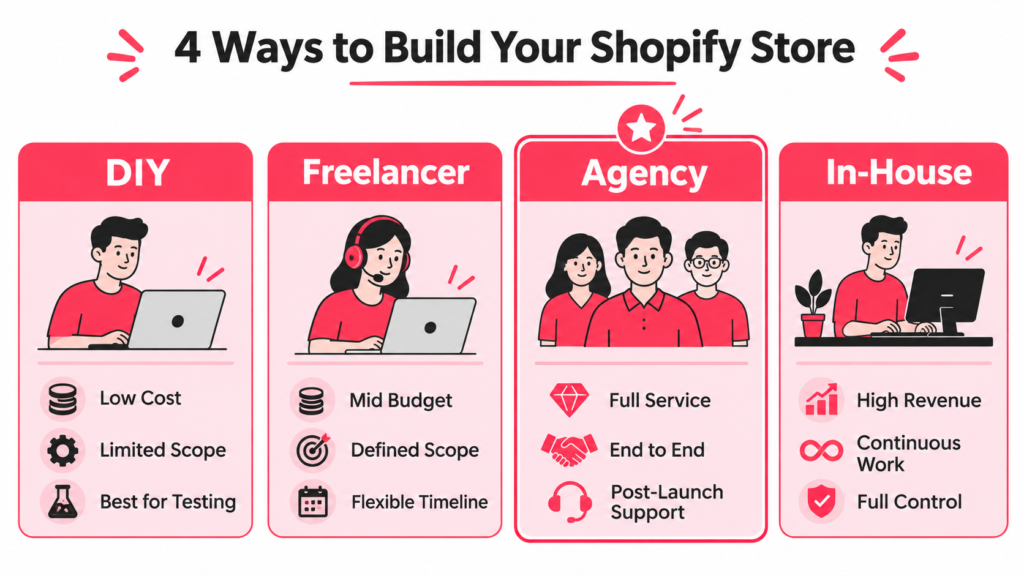
There are four options. Each has a specific use case.
Option 1: DIY (Do It Yourself)
What it means: You build the store yourself using Shopify’s admin, a premium theme, and apps from the App Store.
When it works:
- Budget is under ₹20,000 total
- Product catalog is small (under 30 SKUs)
- You are testing product-market fit before investing in development
- Technical complexity is minimal (simple products, standard checkout)
- You have 2-3 weeks to learn the platform
When it fails:
- You need custom design that themes cannot deliver
- Integrations beyond basic app installs are needed
- Site speed becomes a problem after adding multiple apps
- Conversion rate optimization requires code-level changes
Option 2: Freelance Shopify Developer
What it means: Hiring shopify developer from platforms like Upwork, Fiverr, Toptal, or through referrals.
When it works:
- Budget is ₹30,000–₹80,000
- Scope is well-defined and limited (theme customization, specific integrations, speed optimization)
- You can manage the project yourself (provide requirements, review work, test)
- Timeline is flexible (freelancers juggle multiple clients)
When it fails:
- Scope is unclear or likely to evolve
- You need multiple skill sets (design + development + integrations)
- Post-launch support and maintenance are important
- Communication and accountability are priorities
Key risk: Freelancer availability. If your developer disappears mid-project or becomes unavailable for maintenance, you are stuck with code only they understand.
Option 3: Shopify Development Agency
What it means: Hiring a team (project manager, designer, developer, QA) from an agency that specializes in Shopify.
When it works:
- Budget is ₹80,000–₹5,00,000+
- The project involves design + development + integrations + launch
- You need end-to-end ownership (someone manages the entire process)
- Post-launch maintenance and ongoing development are needed
- Brand is at a stage where the store needs to perform, not just exist
When it fails:
- Budget is under ₹50,000 (agencies have minimum project sizes)
- Scope is too small to justify agency overhead (single page fix, one app integration)
- You want direct developer access without a project management layer
What to look for in an agency:
- Portfolio of D2C brands (not just generic Shopify stores)
- Experience with Indian payment gateways and shipping integrations
- Clear process documentation (timeline, milestones, deliverables)
- Post-launch support structure (retainer options, response time SLAs)
- Client references you can actually contact
Option 4: In-House Developer
What it means: Hiring a full-time Shopify developer on your team.
When it works:
- Monthly revenue is ₹50L+ and growing
- Development needs are continuous (weekly updates, new features, A/B tests)
- You have enough work to keep a developer occupied full-time
- Budget supports ₹40,000–₹80,000/month salary + benefits
When it fails:
- Development needs are intermittent (a few tasks per month)
- You need multiple specializations (design + Liquid + JS + integrations) rare in one person
- Brand is pre-revenue or early-stage
Shopify Development Cost in India (2027)
This is the section most D2C founders come to this page for. Here is a transparent breakdown of what Shopify development actually costs in India not misleading “starting from” ranges, but realistic numbers based on current market rates.
Shopify Plan Pricing in India
Shopify offers four main plan tiers for Indian stores.
| Plan | Monthly Cost (INR) | Best For |
| Shopify Basic | ₹1,994/month | New brands, low order volume |
| Shopify Grow | ₹7,447/month | Growing brands, need reports |
| Shopify Advanced | ₹30,164/month | High volume, advanced reports, lower transaction fees |
| Shopify Plus | From ₹1,75,000/month | Enterprise, ₹5Cr+ revenue brands |
For the latest plan pricing and any changes, check the official Shopify pricing for India.
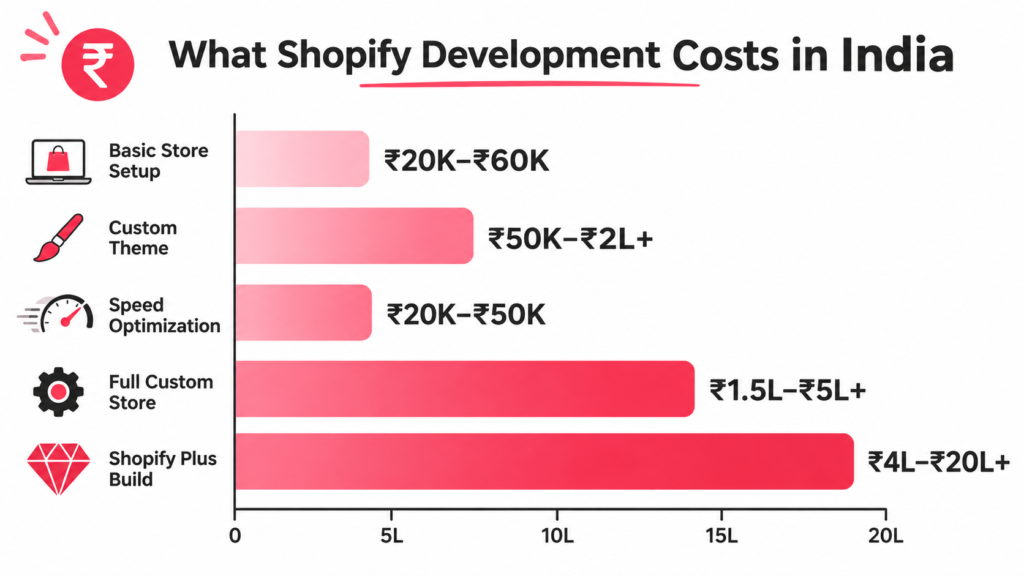
Development Cost by Service Type
These are current market rates in India for Shopify development services:
| Service | Cost Range (INR) | |
| Basic store setup + configuration | ₹20,000–₹60,000 | |
| Theme customization (existing theme) | ₹35,000–₹75,000 | |
| Custom theme development | ₹50,000–₹2,00,000+ | |
| Custom Shopify app | ₹50,000–₹3,00,000+ | |
| Payment gateway integration | ₹5,000–₹15,000 | |
| Shipping aggregator integration | ₹15,000–₹35,000 | |
| WhatsApp Business API integration | ₹15,000–₹30,000 | |
| Platform migration (WooCommerce/Magento to Shopify) | ₹30,000–₹2,00,000+ | |
| Speed and performance optimization | ₹20,000–₹50,000 | |
| Monthly maintenance retainer | ₹8,000–₹20,000/month | |
These ranges reflect agency pricing. Freelancer rates are typically 30-50% lower, but come with the trade-offs discussed in the previous section. For a detailed breakdown, see Shopify developer hourly rates in India.
The Right Tech Stack for Your Revenue Stage
Not every brand needs the same tools. Here is a stage-appropriate tech stack recommendation:
| Revenue Stage | Plan | Key Tools | Monthly App Budget |
| ₹0 to 25L/year | Basic (₹1,994/mo) | Dawn theme, Razorpay, Shiprocket, Judge.me free, Klaviyo free tier | Under ₹3,000 |
| ₹25L to 1Cr/year | Grow (₹7,447/mo) | Premium theme, Razorpay + Cashfree, Shiprocket + Delhivery, GoKwik | ₹8,000 to ₹20,000 |
| ₹1Cr to 5Cr/year | Advanced/Plus | Unicommerce/Increff, Gupshup, SEO agency, custom integrations | ₹25,000 to ₹60,000 |
| ₹5Cr+/year | Plus + headless | ERP integration, multi-storefront, dedicated dev retainer | ₹60,000 to ₹2,00,000 |
The mistake most brands make is over-investing in tools before they have the revenue to justify it. A brand doing ₹10L/year does not need Unicommerce or a ₹60,000/month app budget. Start lean, and scale your tech stack as your revenue grows.
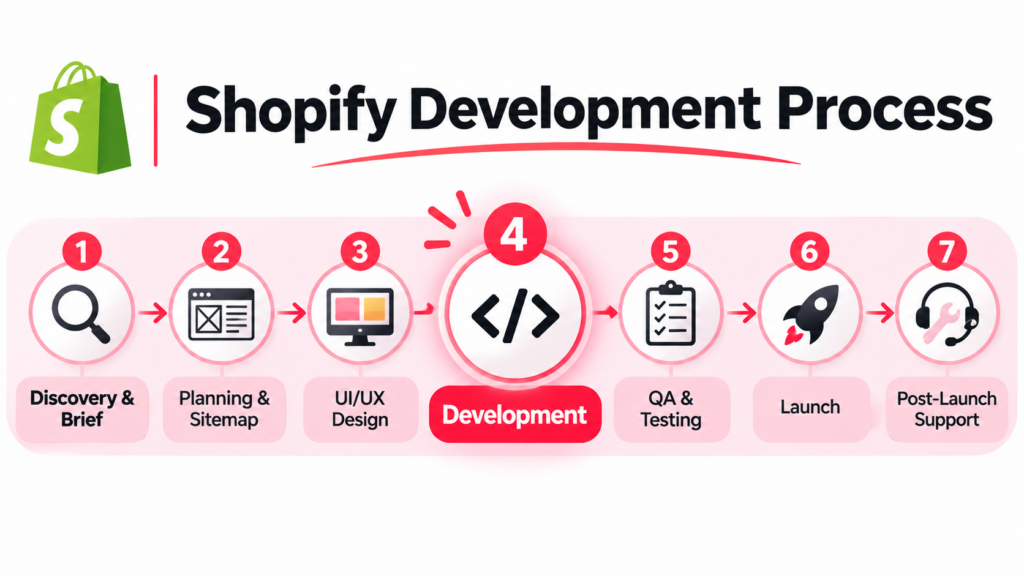
Shopify Development Process: Step by Step
Whether you are building a new Shopify store or migrating from another platform, the development process follows a structured sequence. Here is what a professional Shopify development project looks like from start to finish.
Step 1: Discovery and Requirements Gathering
Before any development begins, the project needs clarity on:
- Brand and business context what you sell, who you sell to, what your competitive landscape looks like
- Technical requirements payment gateways, shipping providers, integrations, existing tools
- Design direction brand guidelines (if they exist), competitor stores you admire, visual preferences
- Scope definition what is included in this project, what is not, what is phase 2
- Budget and timeline alignment realistic expectations based on scope
This step prevents the most common project failure: misaligned expectations. A 30-minute call is not discovery. Proper discovery takes 2-4 hours across 1-2 sessions and results in a written project brief.
Step 2: Design and Wireframing
Shopify Store Design happens before development, not alongside it. This phase includes:
- Homepage wireframe section layout, content hierarchy, mobile arrangement
- Product page design image gallery, description layout, trust signals, add-to-cart flow
- Collection page layout filtering, sorting, product grid structure
- Cart and checkout flow mini cart vs full cart page, upsell placements
- Mobile-first design since 85%+ of Indian D2C traffic is mobile, mobile design is designed first, not adapted from desktop
Design deliverables are typically Figma files. The client reviews and approves designs before development begins. Changes during development are more expensive than changes during design.
Step 3: Shopify Store Setup and Configuration
Once designs are approved, the technical foundation is built:
- Shopify account creation and plan selection
- Store settings country, currency, language, tax configuration
- Payment gateway setup and testing
- Shipping zones and rate configuration
- Policy pages (returns, privacy, terms)
- Email notification templates
- Domain connection and SSL verification
Step 4: Theme Development
This is the core development phase:
- Theme installation or custom theme scaffolding
- Section-by-section development based on approved designs
- Responsive implementation (mobile, tablet, desktop)
- Custom section schemas for Shopify’s theme editor (so the client can edit content without developer help)
- Navigation setup (header, footer, mega menu if applicable)
- Typography, color, and spacing implementation
- Micro-interactions and animations (where appropriate, without affecting performance)
Development happens on a development store, not on a live domain. The client has access to preview and test throughout.
Step 5: Product Setup and Content Migration
While theme development is in progress:
- Product data upload (titles, descriptions, images, variants, prices)
- Collection creation and organization
- Metafield configuration for custom product data
- Product image optimization (compression, alt text, consistent formatting)
- SEO metadata title tags, meta descriptions, URL handles
For migration projects, this includes bulk data import from the source platform and URL redirect mapping.
Step 6: Integration Setup and Testing
Third-party tools are connected and tested:
- Payment gateway test transactions (live mode and sandbox)
- Shipping aggregator rate calculation, label generation, tracking
- WhatsApp Business API order notifications, abandoned cart messages
- Email marketing Klaviyo or equivalent setup, flows configuration
- Analytics Google Analytics 4, Facebook Pixel, conversion tracking
- CRM integration (if applicable)
Each integration is tested end-to-end. A payment gateway that works on sandbox but fails on live mode is not ready for launch.
Step 7: Quality Assurance and Testing
Systematic testing before launch:
- Cross-browser testing Chrome, Safari, Firefox, Edge (mobile and desktop)
- Device testing iOS Safari, Android Chrome, various screen sizes
- Checkout flow testing complete purchase with each payment method, COD flow, discount code application
- Speed testing Google PageSpeed Insights, GTmetrix, Core Web Vitals
- SEO audit robots.txt, sitemap, canonical tags, structured data, mobile-friendliness
- Content review typos, broken links, missing images, placeholder text
- Accessibility check color contrast, alt text, keyboard navigation
Step 8: Launch and Post-Launch Monitoring
Launch day is not the end. The process includes:
- DNS switching pointing the domain to Shopify
- SSL certificate verification ensuring HTTPS works across all pages
- Search console submission submitting sitemap to Google
- Redirect verification confirming all 301 redirects work (critical for migrations)
- Real transaction testing placing actual orders to verify the complete flow
- Performance monitoring tracking page speed, error rates, and checkout completion for the first 2 weeks
- SEO monitoring tracking indexed pages, search rankings, and organic traffic for 60-90 days
A professional development partner does not disappear after launch. The first 30 days are critical for identifying and fixing issues that only surface with real traffic and real transactions.
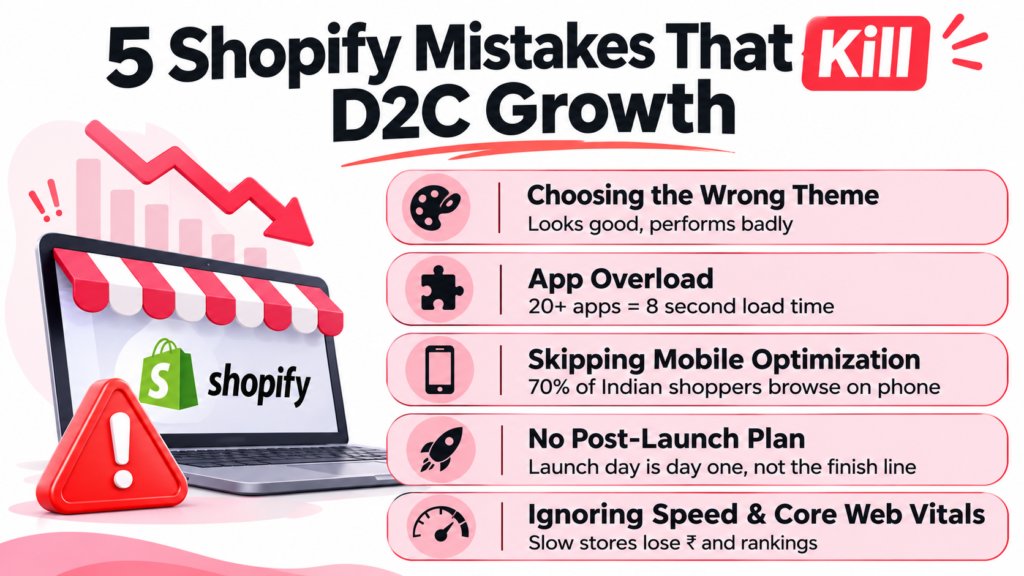
Common Mistakes D2C Brands Make with Shopify Development
After working with multiple D2C brands, these are the patterns we see repeatedly. Each one is avoidable with the right approach.
Mistake 1: Over-Investing in the Store Before Validating the Product
Spending ₹3-5L on custom theme development for a brand that has not yet achieved product-market fit is a common mistake. If you are not sure whether your product will sell, start with a ₹10,000-15,000 theme customization on the Basic plan. Validate first. Invest in custom development when monthly revenue crosses ₹2-3L consistently.
What to do instead: Launch with a clean premium theme (Dawn, Prestige, or Ride). Spend your budget on product photography and ads. When the product starts moving, invest in development.
Mistake 2: Installing Too Many Apps
The average Indian D2C Shopify store has 15-20 apps installed. Each app adds JavaScript and CSS to your store, even when it is not actively being used. By the time you have 15 apps, your store is loading 3-5MB of unnecessary code.
The impact: Page load time goes from 2 seconds to 5-7 seconds. Every additional second of load time reduces conversion rate by approximately 7%.
What to do instead: Audit your apps quarterly. If you are not actively using an app, uninstall it and then have a developer clean up the residual code it left behind. For core functionality (reviews, email, upsells), choose apps that are known for clean code and performance.
Mistake 3: Ignoring Mobile Performance
Designing for desktop first and treating mobile as an afterthought is a critical error for Indian D2C brands. When 85%+ of your traffic is mobile, the mobile experience is the primary experience.
Common mobile issues: Buttons too small to tap, text unreadable without zooming, images not optimized for mobile bandwidth, slow-loading hero sections with large desktop images, checkout forms that are painful to fill on a phone screen.
What to do instead: Design mobile-first. Test every page on actual Android devices on 4G connections (not just Chrome DevTools). Set a performance budget: under 3 seconds load time on mobile 4G.
Mistake 4: Not Setting Up COD Properly
COD is 50-60% of D2C orders in India. Brands that treat COD as a checkbox (enable/disable) rather than a strategic feature lose money on RTO.
What goes wrong: No pin code-based COD availability check, no COD verification (OTP or missed call), no prepaid conversion incentives, no COD order confirmation before dispatch.
What to do instead: Implement pin code-based COD serviceability. Add COD verification through OTP or IVR. Offer ₹30-50 discount for prepaid payment at checkout. Send WhatsApp order confirmation with a “convert to prepaid” option before dispatch.
Mistake 5: Skipping Shopify SEO During Development
Many brands build their Shopify store first and think about SEO later. By that point, URL structures are set, page titles are generic, and there is no structured data.
What to do instead: SEO should be part of the development process from day one. URL handles should be clean and keyword-informed. Title tags and meta descriptions should be written during development, not after. Schema markup (product, organization, FAQ, breadcrumb) should be implemented during development. Image alt text should be set during product upload.
Mistake 6: Choosing a Developer Based on Price Alone
The cheapest Shopify developer is rarely the best investment. A ₹15,000 store build from a Fiverr freelancer will typically result in:
- Generic theme with minimal customization
- No India-specific configuration (COD, GST, shipping)
- No performance optimization
- No post-launch support
- Code quality that makes future modifications expensive
What to do instead: Evaluate based on portfolio (live stores, not mockups), India-specific experience, process maturity, and post-launch support structure. The right agency at ₹1-2L will save you more money in the long run than a ₹15K build that needs to be redone in 6 months.
Mistake 7: Not Planning for Maintenance
Shopify stores need ongoing maintenance. Themes get updates. Apps need compatibility checks. Performance degrades over time. New features need to be added. Security vulnerabilities need to be fixed.
What to do instead: Budget ₹10,000-₹30,000/month for ongoing maintenance from day one. This is not an optional expense, it is part of running an ecommerce business. A maintenance retainer is cheaper than emergency fixes when something breaks during a sale.

Shopify Development Trends in India (2027)
The Shopify ecosystem is evolving rapidly. These are the development trends that are actively shaping how Indian D2C brands build and scale on the platform in 2027.
Checkout Extensibility and Shopify Functions
Shopify has been moving away from the legacy checkout.liquid customization (deprecated for Plus merchants) toward its new Checkout Extensibility framework and Shopify Functions.
For Indian D2C brands, this matters because:
- Custom checkout logic – COD availability by pin code, minimum order value for COD, payment method filtering based on order value or customer segment
- Delivery customization – scheduled delivery slots, express delivery options in metro cities, expected delivery date display
- Post-purchase upsells – one-click upsell offers on the thank-you page
- Checkout UI extensions – trust badges, loyalty points display, custom form fields (GST number for B2B, gift message)
Brands on Shopify Plus should be building on this framework now. It is the future of checkout customization, and legacy approaches will stop working.
AI-Powered Personalization
AI is moving from buzzword to practical application in Shopify development:
- Product recommendations – AI-driven recommendation engines that learn from browsing and purchase behavior (Rebuy, Nosto, LimeSpot)
- Dynamic content personalization – showing different homepage content based on visitor segment (new vs returning, location, browsing history)
- AI-powered search – natural language search that understands intent, not just keyword matching (Searchanise, Algolia)
- Automated copywriting assistance – AI tools for generating product descriptions, meta tags, and email copy at scale
- Chatbot and customer support – AI-powered chatbots that handle order tracking, return requests, and product queries on WhatsApp and website
The practical value for Indian D2C brands is in recommendation engines and AI search – these directly impact conversion rate and average order value.
Headless Commerce and Hydrogen
Shopify’s Hydrogen framework (React-based) and Oxygen hosting enable headless commerce – decoupling the frontend from Shopify’s backend.
What it offers:
- Complete design freedom (no Liquid template constraints)
- Faster page loads through server-side rendering and edge caching
- Multi-storefront capability from one Shopify backend
- Better SEO control (custom URL structures, advanced schema markup)
Reality check for Indian brands:
- Development cost is 3-5x higher than theme-based development
- Ongoing maintenance requires a dedicated frontend developer
- Not every agency can build and support headless architecture
- For 90%+ of Indian D2C brands, a well-optimized theme delivers equivalent results at a fraction of the cost
Headless makes sense for brands with ₹5Cr+ annual revenue, multi-market presence, or genuinely complex product experiences. For everyone else, it is an expensive distraction.
WhatsApp Commerce Integration
WhatsApp is becoming a full commerce channel in India, not just a notification tool:
- Conversational commerce – browsing products, adding to cart, and completing checkout entirely within WhatsApp
- WhatsApp catalog integration – syncing Shopify product catalog to WhatsApp Business catalog
- Automated flows – abandoned cart recovery, order tracking, delivery updates, review collection
- WhatsApp Pay integration – direct payment within WhatsApp conversations
For Indian D2C brands, WhatsApp integration is not a trend – it is an infrastructure requirement. Brands that treat WhatsApp as an afterthought are leaving significant revenue on the table.
Subscription Commerce
Subscription models are growing rapidly in Indian D2C, particularly in:
- Personal care and skincare (monthly replenishment)
- Food and beverage (weekly/monthly deliveries)
- Pet care (recurring product needs)
- Health supplements (monthly subscription boxes)
Shopify’s native subscription APIs and apps like Recharge, Loop Subscriptions, and Bold Subscriptions are making it technically feasible. The development work involves integrating subscription flows into the existing checkout, managing recurring payments through Indian gateways, and building customer portals for subscription management.
Progressive Web Apps (PWA)
PWA technology is gaining relevance for Indian D2C brands because:
- Offline capability – product browsing works even with intermittent connectivity
- App-like experience – without the friction of app store downloads
- Push notifications – re-engagement without an app
- Lower data usage – important for price-sensitive Indian mobile users
PWA is not a replacement for a native app, but for brands that do not justify the ₹5-10L investment in a mobile app, PWA delivers a significant experience improvement at a fraction of the cost.
Frequently Asked Questions
A basic Shopify store setup costs ₹20,000–₹60,000. Custom theme development ranges from ₹50,000–₹2,00,000. Add payment gateway integration, shipping setup, and essential apps, and the total for a production-ready D2C store typically falls between ₹1,00,000–₹3,00,000. The Shopify plan itself starts at ₹1,994/month (Basic) plus 18% GST.
A basic store takes 1 to 2 weeks. A custom store takes 4 to 8 weeks. A Shopify Plus build takes 10 to 20 weeks. This includes discovery, design, development, content migration, testing, and launch. Timelines extend if product photography, content writing, or complex integrations are part of the scope.
For most D2C brands in India, Shopify is the better choice. It handles hosting, security, SSL, and updates – which WooCommerce requires you to manage separately. Shopify’s app ecosystem is more mature for ecommerce-specific needs. The trade-off: WooCommerce offers more customization freedom (it is open-source), but that freedom comes with higher maintenance overhead. If your priority is selling products and not managing servers, Shopify is more practical.
Most D2C brands in India do not need Shopify Plus. At ₹1,75,000/month minimum, Plus makes financial sense only when monthly revenue consistently exceeds ₹40–50L. The features that justify Plus are checkout extensibility (custom checkout logic), Shopify Flow automation, multi-storefront capability, and higher API rate limits. If you are under ₹40L/month revenue, the Advanced plan at ₹30,164/month gives you most of what you need.
Yes, with proper planning. The critical step is 301 redirect mapping – redirecting every old URL to its new Shopify equivalent. This preserves link equity and prevents 404 errors for pages Google has already indexed. Additionally, you need to recreate meta titles, descriptions, and structured data on the new platform. Expect a temporary ranking fluctuation (2–4 weeks) during the migration. With correct redirect mapping and SEO monitoring, most brands recover and often improve their rankings within 60–90 days.
Shopify Payments is not available in India. The most commonly used gateways are Razorpay, PayU, and Cashfree. All three support UPI, credit/debit cards, net banking, and wallets. Razorpay is the most popular among Indian D2C brands due to its developer-friendly API, clean checkout experience, and reliable settlement cycles. Gateway fees are typically 2% per transaction plus 18% GST on the fee.
RTO reduction is a combination of development and operational changes: implement pin code-based COD serviceability checking, add COD verification via OTP or missed call before order confirmation, offer prepaid payment incentives (₹30–50 discount for prepaid), send WhatsApp order confirmation with a “convert to prepaid” option, verify customer address at checkout using pin code validation, and analyze RTO patterns by geography and product category to refine your COD rules.
For most Indian D2C brands, no. Headless development costs 3–5x more than theme-based development, requires a dedicated frontend developer for ongoing maintenance, and adds significant operational complexity. It makes sense only for brands with ₹5Cr+ annual revenue, multi-market operations, or genuinely complex product experiences that Shopify’s theme architecture cannot support. A well-optimized theme on Shopify delivers equivalent performance for 90%+ of D2C use cases.
Monthly maintenance retainers range from ₹8,000–₹20,000 depending on store complexity and update frequency. This covers bug fixes, app updates, performance monitoring, security patches, and minor content updates. Emergency fixes and new feature development are typically billed separately.
Dawn (Shopify’s free flagship theme) is the best starting point for most brands. It is fast, well-coded, and regularly updated by Shopify. For brands that need more built-in features without custom development, Prestige, Impulse, and Ride are strong premium options (₹10,000–25,000 one-time). The best theme is ultimately the one that matches your product catalog structure, visual needs, and budget – not the one with the most features.





This Post Has 2 Comments